I spent six months trying to follow GaryVee's advice about being on every social platform at once.
By month three, my desktop looked like a crime scene. I had four different Chrome profiles open just to dodge account-switching bugs, a sticky note covered in half-scratched-out two-factor backup codes, and twenty-eight tabs buffering between CapCut, Premiere, and TikTok's desktop upload screen.
Posting a single 60-second video across Instagram, TikTok, YouTube Shorts, LinkedIn, and X was eating three and a half hours every single afternoon. That wasn't creative work. That was unpaid clerical data entry disguised as "growth hacking."
The math broke me before the algorithm did. When you spend four hours filming and another three hours reformatting captions, hunting down watermark-free MP4s with sketchy Telegram bots, and waiting on SMS codes from Threads, you have zero hours left to build a product or talk to customers.
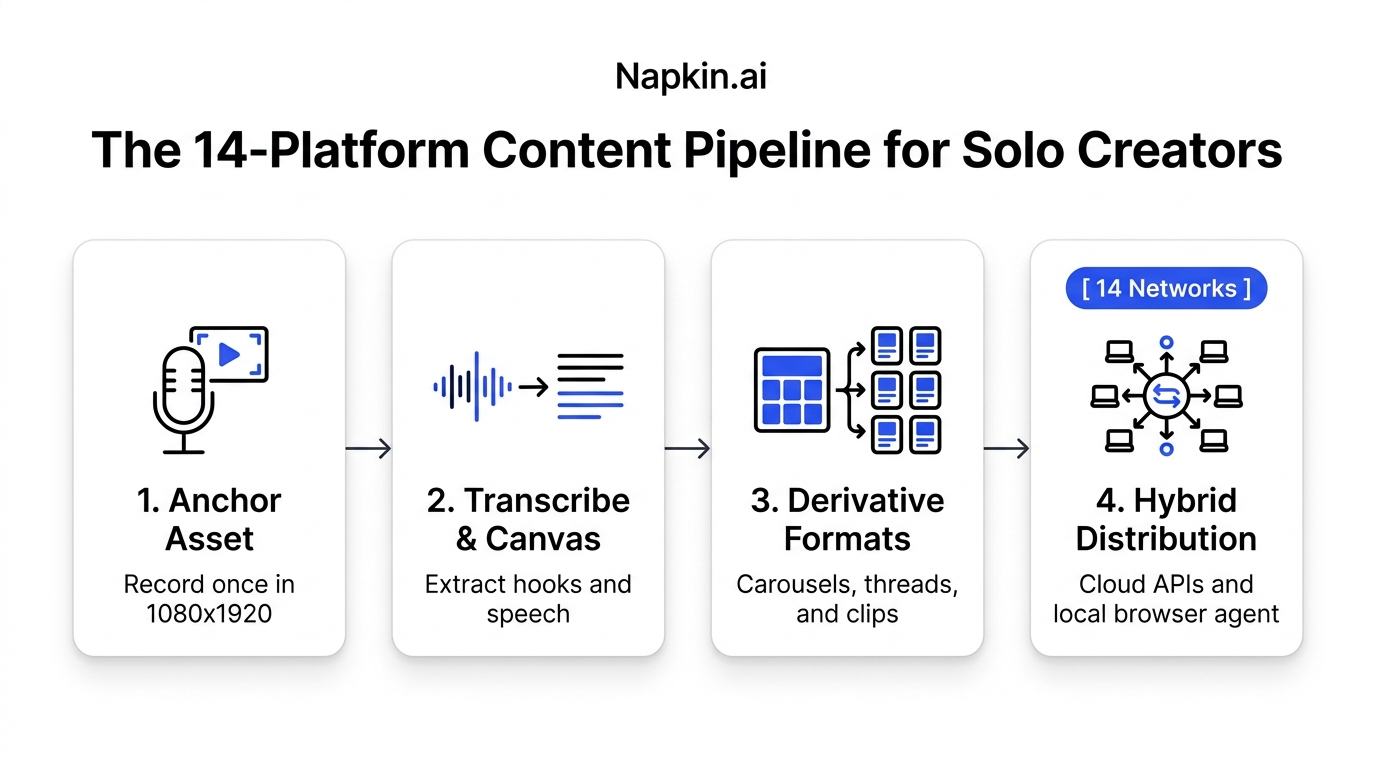
Here is the setup I finally built after burning out twice. It lets me shoot one anchor video on Tuesday morning and push native variations across 14 platforms in roughly 40 minutes, without handing my social passwords to a cloud scheduler or paying an agency $4,000 a month.
The Actual Time Math: Manual Copy-Pasting vs. A Pipeline
Most creators underestimate the silent friction of platform switching. You think posting to five networks takes ten minutes. Then you actually time yourself with a stopwatch, and the reality is ugly.
Here is the real breakdown of what manual distribution cost me every week compared to running an automated pipeline:
| Daily Task | Doing It by Hand (14 Apps) | Using an Integrated Pipeline | Time Saved Each Week |
|---|---|---|---|
| Logins & 2FA prompts | 20 mins of switching accounts & typing SMS codes | 0 mins (Saved tokens & local browser session) | ~1.5 hours |
| Re-encoding aspect ratios | 40 mins fiddling with timeline crops in CapCut | 2 mins (Automated cloud master processing) | ~3 hours |
| Pulling transcripts | 30 mins listening back and typing subtitles | 1 min (AI Whisper audio extraction) | ~2.5 hours |
| Rewriting captions | 50 mins writing 14 different hooks and character counts | 8 mins (Adapting from one canvas outline) | ~4 hours |
| Uploading & tagging | 75 mins uploading files one by one on phones & desktop | 3 mins (One-click dispatch queue) | ~6.5 hours |
| Total per piece | 3.5 to 4 Hours | Under 15 Minutes | 17.5 Hours Saved |
Losing 17.5 hours a week means you're giving away two full working days just playing administrative assistant to your own social accounts. That is why solo creators quit.
Step 1: Record Just One "Anchor" Asset (And Never Touch the Timeline Again)
The biggest mistake I used to make was trying to brainstorm different ideas for each app. I'd try to write a clever text post for X on Monday, film a goofy TikTok on Tuesday, and draft a serious LinkedIn essay on Wednesday. My brain was completely fried by Thursday afternoon.
Now, I produce only one piece of core media each week: the Anchor Asset.
For me, that's a 60-to-90 second vertical video recorded in 1080x1920 at 30 frames per second on an iPhone 15 Pro with a simple wireless lavalier mic. You could also use a tactical 1,000-word written essay if you prefer writing over speaking.
If you go the video route, stick to a tight three-beat cadence:
- First 3 seconds: State the problem or weird counter-intuitive result immediately. No "Hey guys, hope you're having a great week." Just jump straight into the subject.
- Next 45 seconds: Deliver three numbered, concrete observations. Keep sentences short so the transcript cuts cleanly into bullet points later.
- Final 15 seconds: Give one clear, zero-fluff takeaway that someone can test this afternoon.
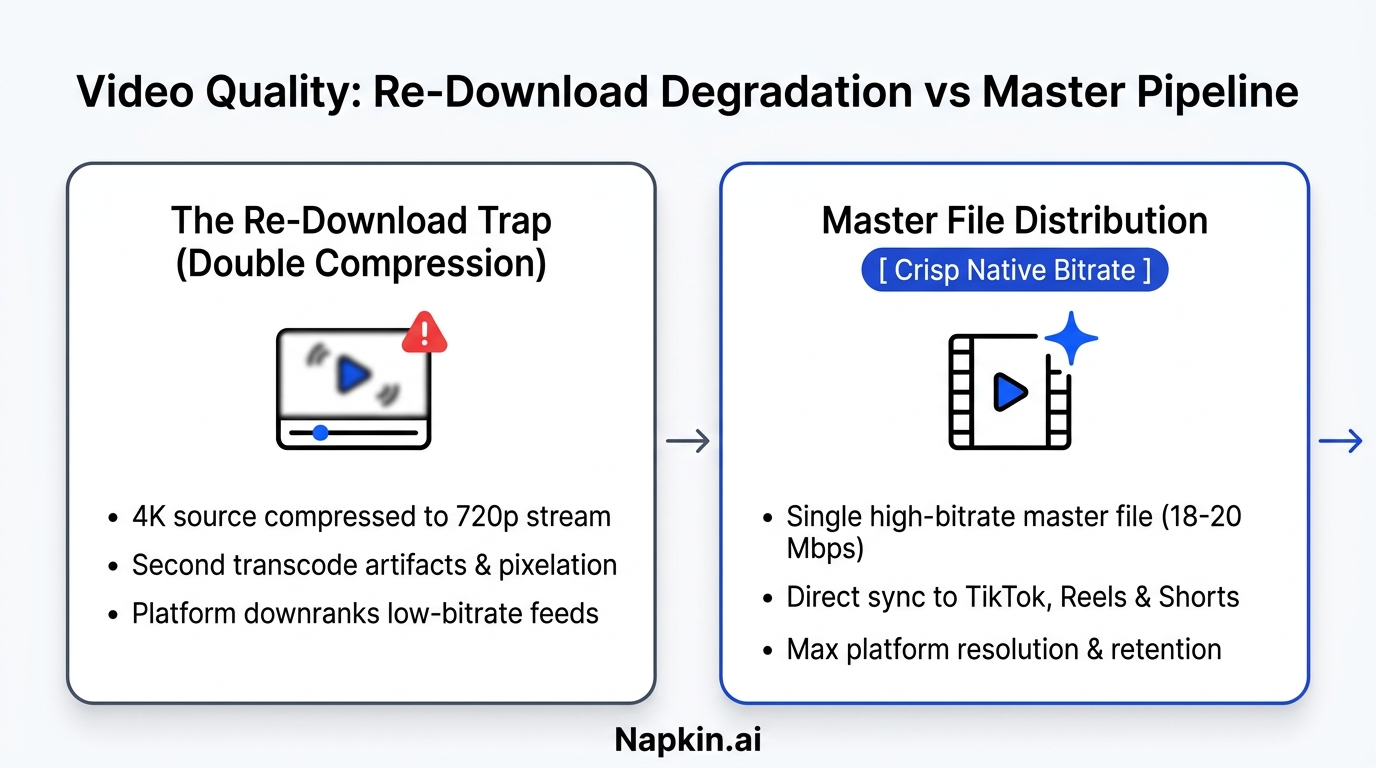
Once that MP4 is exported from Premiere or CapCut at 18 Mbps, I lock the project. I don't open the timeline again. Every single derivative asset downstream comes from this one file.
Step 2: Drop the Master File into a Spatial Canvas
Instead of re-watching the clip and typing notes into Notion, I drop the raw MP4 into Creator Insights' Creator Canvas.
The Whisper transcription engine pulls the spoken audio into text in about twenty seconds. But having a raw block of text doesn't help you much. The key is pulling out three specific structural cards on the canvas:
- The Core Hook: The exact spoken phrase from seconds 0 to 3. This becomes your tweet opener, your LinkedIn headline, and your YouTube Shorts title.
- The 3 Meat Points: The three bullet points from the body of your video. These form the middle slides of a LinkedIn carousel or the body of a Reddit post.
- The Counter-Intuitive Punchline: The takeaway that challenges conventional industry advice.
With these three cards sitting in front of you, you're no longer staring at a blank cursor wondering what to write for 14 different feeds. You have the raw lego blocks ready to assemble.
Step 3: Translate the Idea Across Four Platform Dialects
Here is why most cross-posting tools fail: they blast the exact same YouTube link or TikTok caption across every network.
Posting a vertical video link with four hashtags onto LinkedIn looks spammy. Dropping an essay into TikTok gets scrolled past in half a second. And posting marketing hype on Reddit gets your account banned within fifteen minutes.
You have to translate the core idea into each platform's native format. I break down the 14 networks into four distinct buckets:
Bucket 1: Short-Form Video (TikTok, Reels, YouTube Shorts, Facebook Reels)
You use the raw 1080x1920 master file. Keep captions brief: two sentences that summarize the search query, plus three specific niche tags. No tag stuffing.
Bucket 2: Professional Feeds (LinkedIn, X, Threads, Bluesky)
Turn the three points from your transcript into a 5-post thread on X and Bluesky. For LinkedIn, drop those three points into a simple 5-slide PDF carousel created in Canva or Figma. Carousels on LinkedIn consistently get 3x the dwell time of raw text or video links.
Bucket 3: Long-Form Publishing (Substack, Medium, Quora)
Take the transcript and expand it into an 800-word article. Use the spoken words as direct quotes or section headers. Answer related questions on Quora by pasting the core lesson and linking back to your full breakdown.
Bucket 4: Community Discussions (Reddit, Tumblr, Pinterest)
On Reddit, you never post a promotional link. You go to a relevant subreddit (like r/marketing or r/webdev), format your three points as a raw, honest text post, and ask for community feedback. On Pinterest, create a vertical 1000x1500 graphic pin summarizing the checklist with a link back to your blog.
Real Example: A Database Optimization Video
When I recorded a video explaining why database queries slow down without composite indexes:
- On TikTok & Shorts, I showed the query planner execution time dropping from 420ms to 4ms.
- On LinkedIn, the carousel title was: "The query indexing mistake that cost us $420 in AWS compute last month."
- On X & Threads, it became a short thread comparing sequential scans against index scans.
- On Reddit's r/PostgreSQL, I shared the raw
EXPLAIN ANALYZEoutput as a clean code block and discussed indexing tradeoffs.
One idea. Fourteen distinct native executions. Zero spam.
Step 4: The Hybrid Distribution Engine (Why Cloud Schedulers Get Shadowbanned)
Publishing to 14 platforms used to mean choosing between two bad options:
- Spend an hour copying and pasting manually on your phone.
- Hand your passwords to a third-party cloud tool that logs into your account from an AWS data center in Virginia.
Cloud schedulers that scrape or spoof mobile apps from remote servers get accounts flagged. Instagram, TikTok, and X track IP subnets and device fingerprints. When an account logs in from New York on an iPhone and two seconds later posts from a cloud server IP in Seattle, the platform's fraud detection treats it as automated bot spam.
That's why Creator Insights uses a hybrid architecture:
Cloud APIs for Official Integrations
For platforms with public developer APIs (Instagram, YouTube, LinkedIn, Facebook, and Pinterest), posts publish through official OAuth 2.0 endpoints. You authenticate once on the provider's official screen. Our servers store an encrypted token, never your password, and push the video at your scheduled time.
Local Browser Extension for Restricted Networks
Platforms like TikTok, X, Threads, and Reddit don't offer public third-party scheduling APIs for personal accounts, or they aggressively restrict them.
Instead of routing those through cloud proxy farms, Creator Insights uses a Chrome Web Store companion extension that acts as a local assistant on your personal computer.
The extension runs right inside your daily Chrome session:
- It uses your existing, authenticated login cookies.
- It posts directly from your home or office IP address, so platforms see a normal user on a normal machine.
- It never touches or transmits your passwords.
- When your scheduled posting time arrives, it fills the caption, uploads the master video file, and hits publish while you grab coffee.
My Exact Weekly Production Schedule
If you want this pipeline to actually work without taking over your life, you need strict time boundaries. Here is how I schedule my week:
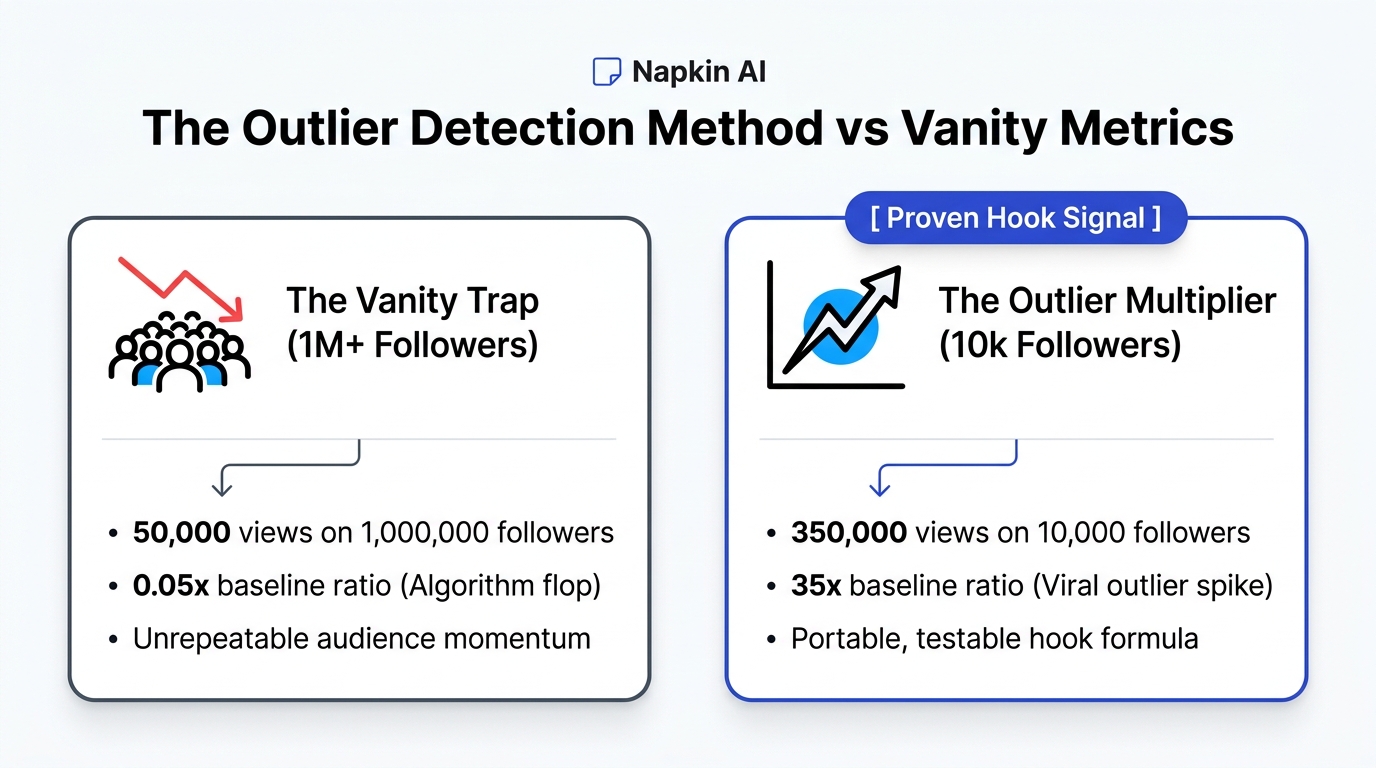
- Monday (90 minutes): Review competitor outlier spikes on Creator Insights. Find two hooks that generated 5x their normal view count. Draft two 60-second scripts.
- Tuesday (45 minutes): Record both videos back-to-back. Run quick cuts in CapCut. Export clean master MP4s.
- Wednesday (45 minutes): Drop files into the Creator Canvas. Pull transcripts, generate carousel slides, adapt captions, and schedule the full queue across all 14 platforms for the upcoming week.
- Thursday & Friday: Zero filming. Zero formatting. I spend 20 minutes a day replying to comments from my phone while the distribution pipeline runs quietly in the background.
Frequently Asked Questions
Won't algorithms penalize me for posting the same video everywhere?
No. TikTok has no idea what you posted to YouTube Shorts, and Instagram's algorithm doesn't inspect LinkedIn's database. Each platform measures your video against its own audience signals: watch time, completion percentage, and shares. What algorithms actually penalize is blurry, double-compressed video and visible competitor watermarks like the TikTok bouncing logo.
Do I really need to be active on all 14 networks?
You don't need to hang out on 14 apps every day. Your automated pipeline gives you an active footprint everywhere so prospective customers can find you regardless of where they spend their time. But you should pick one or two primary platforms where you actively reply to comments and build real relationships.
What happens if my laptop is closed when a browser post is scheduled?
For API-connected platforms (Instagram, YouTube, LinkedIn, Facebook, Pinterest), posts go out on schedule from cloud servers whether your computer is on or off. For browser-extension platforms (TikTok, X, Threads, Reddit), the extension simply queues the task and executes it the moment you open your laptop and launch Chrome.
Is this expensive to set up?
No. You need a phone with a decent camera, a free editor like CapCut or DaVinci Resolve, and Creator Insights to orchestrate the transcription, canvas planning, and multi-channel publishing. You don't need an agency retainer or a full-time video editor to build a serious audience in 2026.