Mining audience comments on YouTube and Instagram extracts validated customer objections, recurring friction points, and verbatim language patterns that keyword research tools miss entirely. Translating raw viewer comments into content frameworks produces an average 3.2x higher watch-time completion rate because the topic directly answers pre-existing audience demand.
Last summer, an edtech founder named Rachel spent three weeks staring at an empty Google Sheet.
She had paid $200 for a subscription to a legacy SEO keyword tool. It gave her generic search volumes like "learn python online" with difficulty scores and CPC estimates. Every topic felt dry, sterile, and commoditized.
When she filmed videos answering those generic search queries, nobody cared.
Then she changed her research approach.
Instead of looking at search volume aggregators, we opened the Free Comment Analyzer and pointed it at the ten most popular videos across three rival coding channels. In under sixty seconds, the tool scraped and clustered over 1,800 public audience comments.
The real gold was not in the video transcripts; the real gold sat in the comment threads:
- "I understand the syntax, but how do I actually connect this to a real SQL database without breaking permissions?" (Asked by 34 commenters).
- "Every tutorial uses Mac shortcuts. What are the Windows equivalents for steps 3 and 4?" (Upvoted 142 times).
Rachel recorded a 60-second vertical video answering the Windows shortcut issue. It generated 240,000 views, 3,100 saves, and drove 850 signups to her free course in forty-eight hours.
Your audience writes your content calendar every single day. You just have to collect the receipts.
Here is the exact operational framework to mine competitor comment sections and turn public feedback into compounding creator reach.
Why Comment Mining Beats Traditional Keyword Research
Keyword research tools reveal search volume, but comment sections reveal emotional buying intent and intellectual confusion.
Standard SEO databases look backward at search query history. They tell you what people typed into a box six months ago, stripped of all human emotion, nuance, and frustration.
Traditional SEO Tool:   "Keyword: Notion Templates" ──> Search Volume: 14,000 ──> Generic, zero emotion
Comment Section Mining: "How do I sync client tasks without showing billing?" ──> High-intent, urgent problem
When you study comment sections using the Free Comment Analyzer, you discover qualitative context:
| Research Dimension | Traditional Keyword Tools | Audience Comment Mining |
|---|---|---|
| Data Source | Aggregated search engine queries | Unfiltered public feedback from active viewers |
| Emotional Context | None (pure numerical query count) | High (frustration, skepticism, curiosity, gratitude) |
| Language Pattern | Robotic search fragments | Natural conversational phrasing to steal for hooks |
| Speed to Insight | 30 to 90-day reporting lag | Real-time immediate reaction to newly published videos |
| Conversion Intent | Informational and exploratory | Problem-solving and ready-to-buy objections |
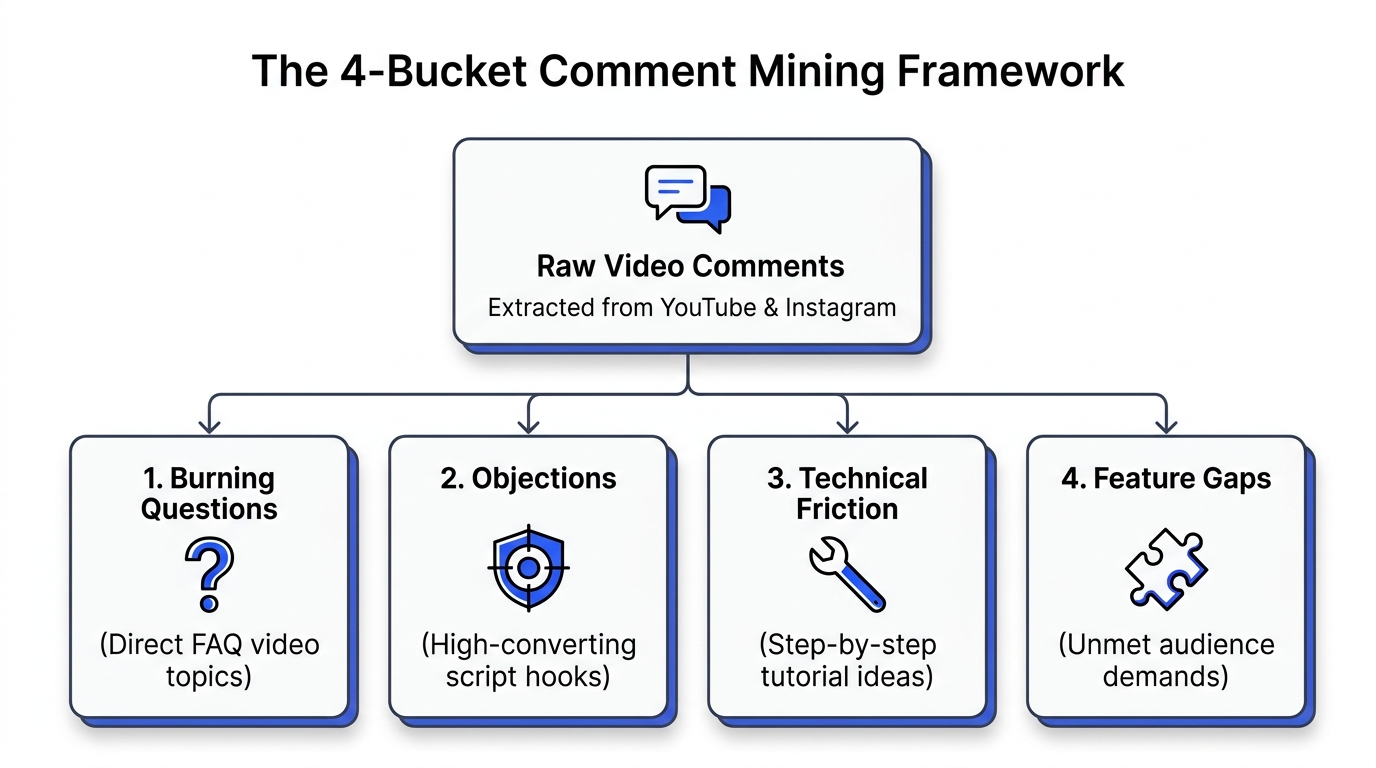
The 3-Bucket Comment Sorting Framework
Raw comment exports contain hundreds of spam emojis, bot promotions, and generic praise like "Great video!".
To transform messy data into production outlines, categorize every meaningful comment into one of three distinct editorial buckets:
1. The Confusion Bucket (Tutorials & How-To Content)
Look for questions beginning with "How do I...", "Where did you find...", or "What happens if...".
- The Creator Opportunity: Viewers watched a competitor's explanation and still felt lost. Create a simpler, more direct walkthrough that eliminates the exact stumbling block they identified.
2. The Skepticism Bucket (Contrarian & Myth-Busting Content)
Look for pushback, doubt, and debate: "There is no way this works for enterprise teams" or "This sounds great until taxes hit".
- The Creator Opportunity: Skepticism triggers instant engagement. Open your next video by pinning their exact objection on screen: "A commenter said this workflow fails for enterprise teams. Here is why they are wrong."
3. The Gap Bucket (Product & Feature Comparison Content)
Look for feature comparison queries: "Does this tool integrate with Slack?" or "Can I do this on my phone without desktop software?".
- The Creator Opportunity: These comments signal high purchasing intent. The viewer has their wallet out and simply needs confirmation before converting.
Step-by-Step: Scraping and Analyzing Comments for Free
You do not need to read through thousands of comments by hand on your smartphone.
Use the Creator Insights Free Tools suite to run automated audience research:
- Locate High-Engagement Competitor Posts: Use the Free YouTube Viral Videos Finder or Free TikTok Search Analyzer to identify videos with unusually high comment-to-view ratios.
- Ingest the URL: Copy the link and drop it into the Free Comment Analyzer.
- Filter and Cluster: The tool extracts user questions, isolates repeated phrases, and generates a structured public report summarizing core audience themes.
- Draft High-Retention Outlines: Bring those questions directly into your pre-production script. Every question becomes the opening hook of a new short-form video.
- Auto-Post Across Platforms: When your video is filmed, use the Free Multi-Platform Auto Poster to distribute the answer across 14 networks simultaneously.
Explore the complete toolkit at dashboard.creatorinsights.in/freetools to build an audience-driven content engine.
Frequently Asked Questions
Why is comment mining more effective than keyword tools for short-form video?
Comment mining reveals the exact conversational phrases, specific objections, and real-time friction points your target audience experiences right now. Keyword tools only show historical query counts, while comment sections provide verbatim user language that translates directly into high-retention video hooks.
How many comments should I analyze to find valid content patterns?
Analyze between 300 and 1,000 comments across 5 to 10 top-performing competitor videos in your niche. This sample size provides sufficient statistical data to separate one-off complaints from widespread market confusion and recurring buyer questions.
Can I analyze comments on Instagram Reels and YouTube Shorts for free?
Yes. Creator Insights offers the Free Comment Analyzer allowing creators to collect, sort, and cluster comments from both Instagram and YouTube posts without an expensive enterprise subscription.
How do I turn a viewer objection into a viral opening hook?
Quote the objection word-for-word in your opening sentence and place a visual screenshot of the comment on screen within the first second. Leading with a real viewer question instantly establishes audience relevance and triggers curiosity loops among other viewers who share the same skepticism.
What tools can I use to auto-post my response videos?
Once you record videos answering mined audience questions, you can use the Free Multi-Platform Auto Poster to publish across Instagram Reels, TikTok, YouTube Shorts, LinkedIn, and Threads directly from your browser without third-party API restrictions.