
Tracking competitor publishing activity across Instagram, YouTube, and TikTok requires an automated daily monitoring feed that collects public posts and engagement metrics in one dashboard. Monitoring competitors through an independent tracking workspace keeps your personal social algorithms clean while alerting you to emerging formats, posting schedules, and topic spikes.
Four months ago, I ruined my personal TikTok and Instagram algorithms completely. Every morning, I opened Instagram to check what five creators in my vertical posted. I watched their Stories. I scrolled through their TikTok video libraries to see which hooks worked.
By week three, my personal feeds were unbearable. I opened TikTok at 11 PM to watch cooking recipes and comedy clips. Instead, the algorithm shoved twenty consecutive videos from my direct business competitors onto my screen.
The recommendation engines assumed I was obsessed with these accounts. I was. But only for business research.
Manual snooping creates two massive problems. First, it pollutes your leisure time with work stress. Second, you waste forty minutes every morning jumping between three separate mobile apps just to check whether someone uploaded a new short-form clip.
Treat competitive intelligence like an automated data feed. Check the data in one view, take notes, and get back to creating original work.
Why Manual Profile Snooping Fails Modern Creators
Relying on manual visits to competitor profiles wastes creative energy and blinds you to broader posting patterns.
Manual profile checking causes several immediate setbacks:
- Platform algorithms flood your personal feed with competitor content.
- Pinned posts disguise whether an account's recent uploads actually gained traction.
- You miss deleted posts or short-lived tests that failed within twelve hours.
- Calculating engagement ratios across multiple platforms by hand takes hours.
If a competitor publishes four Reels, two TikToks, and a YouTube Short each week, tracking that output across fifteen creators means checking sixty different profile links. Nobody maintains that habit for more than two weeks.
Automating the collection gives you a single chronological feed of newly published material without opening individual apps.
Manual Social Snooping vs. Automated Competitor Post Tracking
Direct profile visits provide fragmented impressions, while automated tracking surfaces verifiable publishing patterns:
| Dimension | Manual App Snooping | Automated Competitor Post Tracking |
|---|---|---|
| Feed Impact | Destroys personal algorithmic recommendations | Zero effect on your personal social accounts |
| Time Required | 45 minutes of manual checking per day | 5 minutes to scan a single daily dashboard |
| Data Scope | Fragmented across 3 mobile applications | Unified daily feed across Instagram, YouTube, and TikTok |
| Historical Context | Pinned posts obscure recent upload drops | Transparent chronological history of recent posts |
| Idea Extraction | Disorganized screenshots and loose links | One-click export to Creator Canvas for script adaptation |
| Analytics Access | Mental guesses based on raw like counts | Clean view of public views, comments, and engagement |
How to Set Up Daily Competitor Tracking in Under 5 Minutes
Setting up automated competitor intelligence requires organizing your watchlist and establishing a weekly review schedule.
Here is the exact step-by-step workflow:
1. Build Your Creator Watchlist
Open Competitor Tracking inside Creator Insights. Add the public profile URLs of five to ten creators in your specific niche across Instagram, YouTube, and TikTok. Focus on creators producing content for the exact audience you want to serve, rather than generic celebrity accounts with millions of casual followers.
2. Review the Daily Tracking Updates
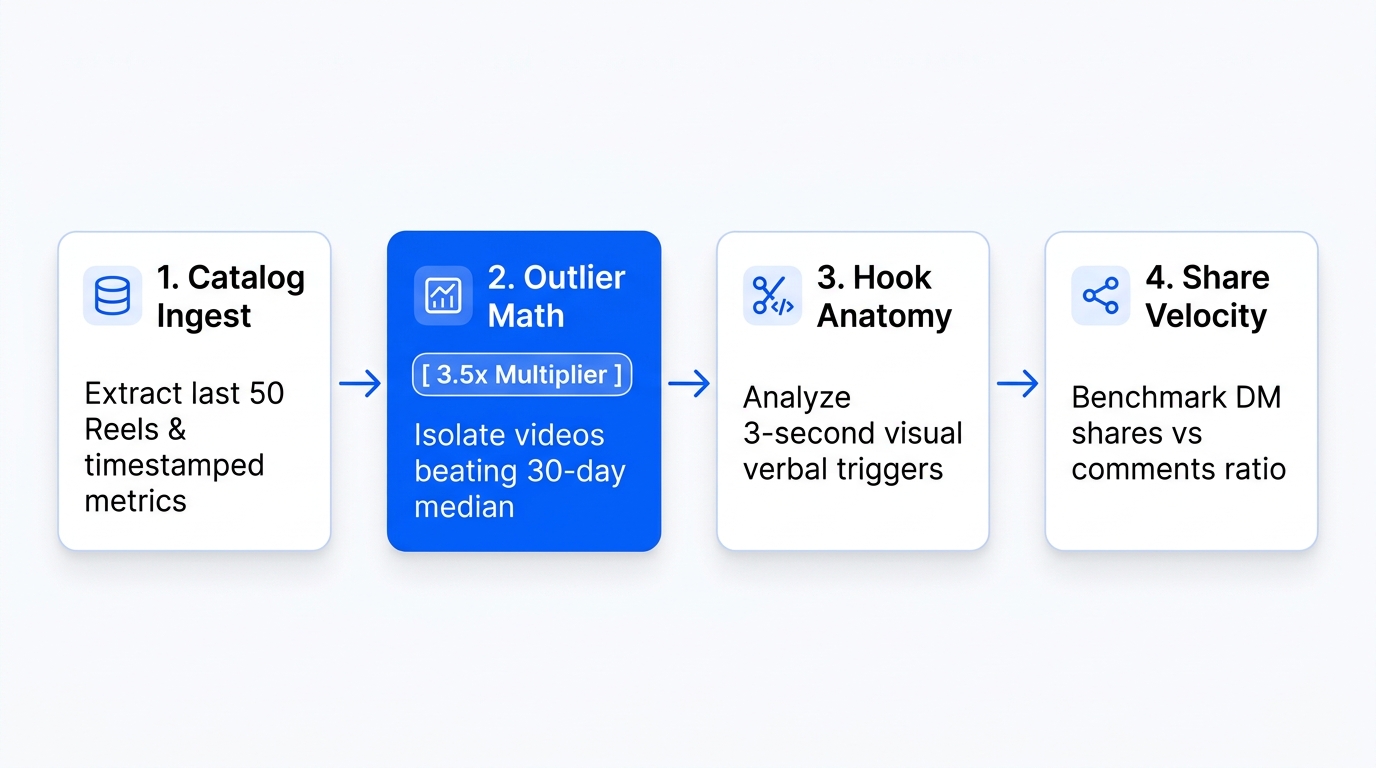
Each morning, open your tracking dashboard. Instead of browsing twenty profiles, review newly collected posts in a single stream. You see which topics competitors covered over the past twenty-four hours, the exact video formats they tested, and how early view counts compare to their normal baseline.
3. Identify Outlier Topics and Format Shifts
Look for unusual publishing choices. Did a competitor who usually posts face-to-camera videos suddenly get 3x more comments on a text-heavy carousel? Did an obscure technical tutorial generate twenty thousand views on YouTube Shorts?
Unusual spikes reveal an underserved question in your shared market.
4. Send Source Posts to Your Canvas to Script Counter-Angles
Never copy a competitor's video point for point. Duplicate content damages your brand authority and bores audiences who already follow both accounts.
Instead, select the tracked post and push it into your Script Generator. Use your workspace context to draft an original counter-narrative:
Tracked Competitor Hook: "Why you should never use paid ads before making $10k/month."
Your Counter-Angle Hook: "I spent $50 on Meta ads during my first week in business. Here is how that tiny budget saved me three months of cold outreach."
You build upon the proven topic interest while offering an alternative, authentic viewpoint rooted in your own background.
What Metrics You Can Track (And What Stays Private)
Ethical competitor tracking relies exclusively on verified public platform signals.
The tracking suite inspects public views, likes, comment totals, publish timestamps, and caption copy. It does not provide access to private creator analytics such as exact subscriber churn, retention drop-off graphs, or private direct message exchanges.
Public data is more than enough to spot trends. When you observe that five different competitors published videos about the same software update within forty-eight hours, you know market interest has peaked.
Connecting Competitor Intel to Your Entire Content Engine
Tracking competitors is only the first step. You need a fast distribution pipeline to publish your response before the topic cools off.
If you need broad inspiration across entire niches rather than specific creator handles, search keywords in Popular Videos to compare trending clips across Instagram, YouTube, and TikTok. When you spot active discussions under competitor posts, open the Engage Comment Assistant to leave helpful, human-reviewed replies on X, Threads, and Substack Notes.
Once your counter-argument script is filmed, drop the MP4 file into the Multi-Post Composer to publish native formats across fourteen social platforms. If you run your workflow through AI agents, connect the Creator Insights MCP Server to query competitor post metrics directly from Claude Desktop or Cursor.
Frequently Asked Questions
Will competitors know that I am tracking their profiles?
No. Competitor tracking uses public data collection methods. The accounts you follow receive zero notifications, and your personal profile handle is never connected to the tracking queries.
Which platforms are supported for competitor post tracking?
The tracking dashboard supports public creator profiles on Instagram, YouTube, and TikTok. Browser-based inspection for text networks like LinkedIn, X, and Substack Notes is supported through the extension and workspace audit tools.
How often does the competitor dashboard update?
The system collects new public posts on a daily schedule. When you open the dashboard, you receive an organized summary of yesterday's publishing activity across your tracked list.
Can I track private Instagram or TikTok accounts?
No. The system only tracks public creator and business profiles. It cannot access private accounts, locked feeds, or content hidden behind membership tiers.