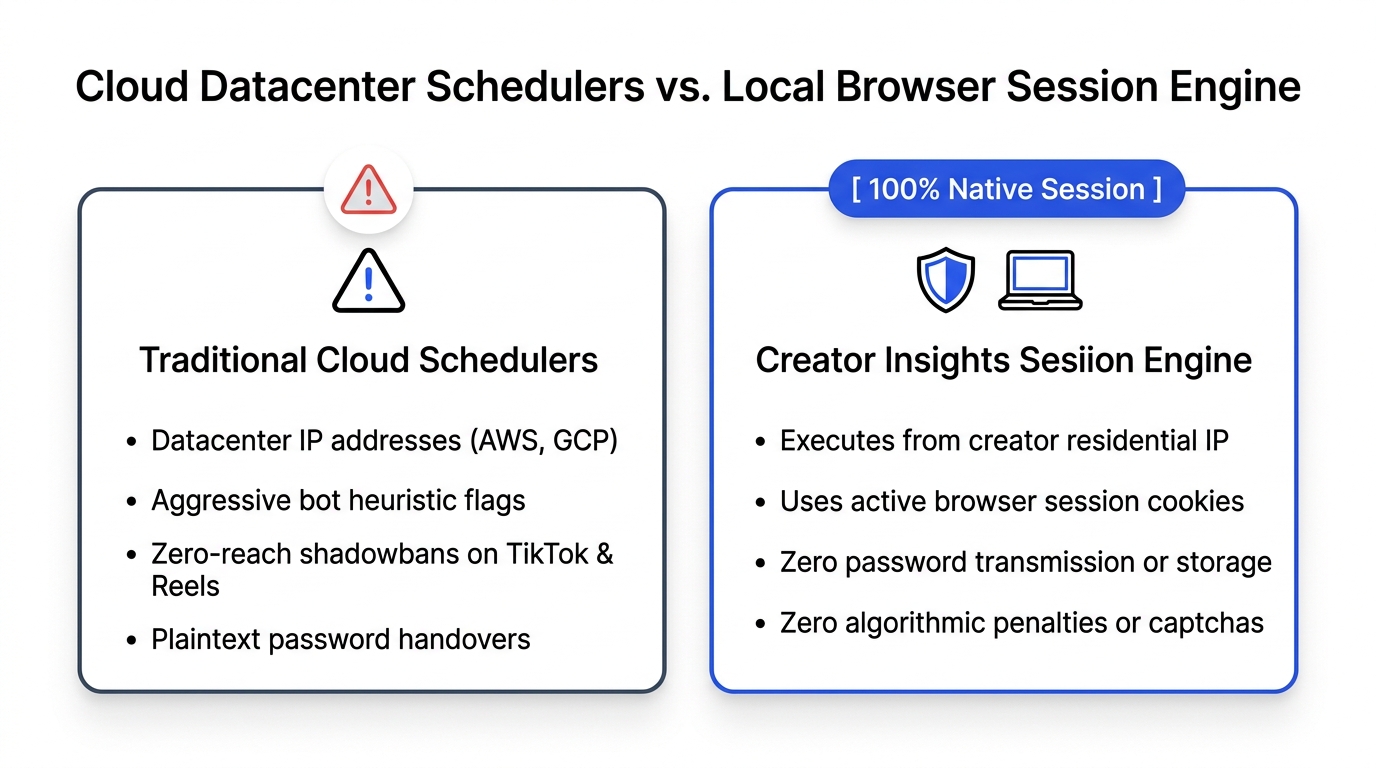
Unsupervised AI comment bots trigger platform bans and shadowbans because they lack natural human typing telemetry, dispatch repetitive synthetic text patterns through commercial datacenter IP addresses, and fire comments faster than human physiological limits allow. Supervised in-browser engagement fixes this by generating context-aware drafts inside your real desktop browser session while requiring human review and approval before any comment is submitted.
In August 2025, Marcus managed social media for six direct-to-consumer health brands.
His clients wanted rapid community growth on X and LinkedIn. To automate the grind of networking, Marcus bought a subscription to a cloud-based AI comment bot. The software promised to "automatically leave 200 AI-powered comments on trending niche posts every afternoon while you sleep."
Marcus connected his clients' account credentials to the cloud server, set a list of target hashtags, and turned the software on.
For the first twenty-four hours, the dashboard looked like a miracle. The bot dropped hundreds of comments across founder threads.
Then the disaster hit.
Under an emotional post written by a founder announcing the closure of his startup due to family health issues, the automated bot left a cheerful generic response: "Amazing insights! Keep crushing it in 2025! 🚀🔥"
Within ten minutes, angry comments flooded the thread calling out the brand for heartless automated spam. Two hours later, LinkedIn suspended three of Marcus's client accounts for abnormal activity. On X, the remaining accounts were hit with severe shadowbans, reducing impressions from 10,000 to single digits.
Marcus spent two weeks on frantic apology calls with furious brand founders. He lost three client retainers in a single afternoon.
Automating social engagement with unsupervised bots is like sending a bull into a china shop. When you remove human review, disaster is only a matter of time.
The Technical Traps: How Platform Anti-Spam Systems Detect Bots
Social media platforms employ sophisticated behavioural fingerprinting algorithms that analyze network packet origin, interaction telemetry, and linguistic similarity to detect automated bots within minutes.
Cloud Spam Bot:    [Datacenter IP] ──> [Instant Text Injection] ──> [0ms Mouse Cadence]  ──> Shadowban / Suspension
Supervised Assist: [Residential IP] ──> [In-Browser Draft]      ──> [Human Review & Click] ──> 100% Organic Delivery
Many creators believe platforms only detect spam if someone reports their account. In reality, platform security models analyze every comment before it even renders on other users' screens.
Here are the four primary telemetry signals platforms use to catch automated comment bots:
1. Keystroke Dynamics and Typing Cadence
Real humans do not paste four sentences into an input field in zero milliseconds. Human typing exhibits natural irregularities: variable intervals between keystrokes (between 80ms and 250ms), occasional backspaces to fix typos, and brief pauses while thinking. Cloud bots inject raw text strings directly into the DOM tree, instantly signaling automated automation.
2. Mouse Trajectory and Touch Coordinates
When a human moves their cursor to click the "Reply" button, the mouse follows a curved, imperfect path with micro-accelerations and decelerations. Headless browser bots and API scrapers trigger synthetic click events with zero coordinate history, causing platform fraud detection scripts to flag the session.
3. Commercial Datacenter IP Signatures
Cloud bots run on remote virtual servers hosted by providers like AWS, DigitalOcean, or Hetzner. Social media platforms maintain real-time blocklists of commercial IP subnets. A connection originating from an Amazon Web Services server trying to post to a personal LinkedIn feed is treated as suspicious by default.
4. Semantic Repetition and Hallucination
Language models running without human supervision repeat predictable syntactic templates. When a bot posts variations of the same three conversational frameworks across fifty accounts in one hour, platform natural language processing models cluster those comments as coordinated spam.
To keep your community engagement compliant with platform rules, creators use the Engage Comment Assistant, which operates entirely inside an active human browser session.
The Supervised Engagement Architecture: How It Works
Supervised engagement pairs AI drafting speed with mandatory human editorial oversight, keeping you in complete control of every single published word.
[Target Post on Feed]
         │
         ▼
[Engage Extension Scans Context]
         │
         ▼
[AI Drafts 3 Tailored Angles (Using Your Workspace Brand Voice)]
         │
         ▼
[You Review, Edit, or Personalize the Text]
         │
         ▼
[You Approve & Submit via Native Platform Web Composer]
The core difference between a reckless bot and an intelligent assistant is who has final authority.
Here is why supervised browser engagement keeps your accounts safe:
- Runs in Your Authenticated Browser: The extension operates directly inside your active Chrome session, utilizing your existing residential IP address and authentic login cookies.
- Drafts, But Never Posts Silently: The AI never publishes a comment on its own. It reads the post context, brings in your workspace brand rules, and generates candidate drafts for your inspection.
- You Edit Before You Approve: You can tweak a sentence, add a personal anecdote, or discard the draft entirely with one click.
- Enforced Safety Guardrails: The tool enforces hard platform limits (such as a maximum of 50 replies per six hours on X and Threads, and 10 on LinkedIn) to prevent creators from accidentally over-engaging.
Comparison: Autonomous Spam Bots vs. Supervised In-Browser Assistants
Understanding the operational differences between automated bot software and supervised extensions protects your brand reputation and account longevity.
| Feature / Metric | Autonomous Cloud Bots | Supervised In-Browser Assistant (Engage) |
|---|---|---|
| Human Oversight | Zero. bot posts automatically | 100%. human reviews and approves every post |
| Tone Precision | Generic, robotic, prone to embarrassing mistakes | Tailored to your specific workspace brand voice |
| Network Footprint | Datacenter IP addresses (AWS, DigitalOcean) | Your genuine home or office residential IP |
| Interaction Telemetry | Synthetic instant text injection | Native browser keystrokes and human mouse clicks |
| Account Safety | High risk of suspension or shadowbans | Fully compliant with platform user terms |
| Community Trust | Destroys brand credibility when caught | Builds genuine peer relationships and followers |
| Posting Guardrails | None. blasts until the platform blocks you | Strict built-in rate limits to prevent fatigue |
4 Rules for Safe, High-Yield Commenting in 2026
Follow these four operational rules to grow your audience through comments without risking account flags:
- Never Automate the Publish Button: Let AI do the heavy lifting of reading threads and drafting perspectives, but keep the final publishing decision under your own fingertip.
- Read the Post Before Approving: Never approve a reply without scanning the original post to ensure the tone is appropriate for sensitive topics or company news.
- Train Your Voice with Concrete Rules: Open your workspace settings in the Engage Comment Assistant and teach the model what words to avoid and what tone to use (such as practical, witty, or analytical).
- Audit Your Profile Performance Regularly: As your comments drive inbound visitors to your account, audit your profile conversion rates using the Social Media Profile Audit on Creator Insights.
Frequently Asked Questions About AI Comment Assistants and Safety
Is using an AI comment assistant against social media terms of service?
Using a supervised desktop assistant that helps you write text inside your browser is completely compliant. Platform policies explicitly target automated headless bots, fake engagement rings, and unauthorized mass-messaging scripts. Because you review, edit, and submit the comments yourself, the platform treats your activity as natural human engagement.
What is the difference between an AI comment bot and an AI assistant?
An AI comment bot runs automatically on external cloud servers, posting canned messages without human oversight. An AI assistant (like Engage) works alongside you in your browser, generating smart drafts that you inspect, adjust, and approve before posting.
Why does the Engage extension limit replies on LinkedIn to 10 per session?
LinkedIn monitors account velocity strictly. Firing dozens of comments in a short period triggers account warnings. Setting a conservative cap of 10 thoughtful replies per session ensures your account maintains an impeccable safety score while maximizing the value of each interaction.
Can an AI comment assistant understand my industry's technical jargon?
Yes. With the Engage Comment Assistant, you can configure your workspace brand knowledge with industry whitepapers, case studies, and proprietary terminology so the assistant drafts responses like an experienced peer rather than a generic language model.
Where can I access free tools to research viral video ideas and plan multi-platform posts?
Access our complete suite of creator intelligence tools in the Free Tools Catalog, analyze audience comment sentiment with the Free Comment Analyzer, and syndicate your winning posts across fourteen networks with the Multi-Platform Distribution Tool.