I checked my TikTok analytics at 2:00 AM last winter.
A video I posted forty-eight hours earlier was flatlining. It had gained 12,000 views in the first eighteen hours on the For You Page (FYP). Then the recommendation graph abruptly stopped. The real-time view graph plummeted to three views per hour.
That is the vicious treadmill of feed-based social media: you are only as good as the video you published yesterday afternoon. If you stop posting for four days, your impressions drop off a cliff.
Then I noticed an anomaly in my traffic sources.
An older, plain-looking tutorial video I recorded eight months earlier on "how to connect Stripe to a Supabase database" was quietly generating 450 views every single day.
No viral dance sound. No dramatic cliffhanger hook. Just steady, uninterrupted traffic.
When I clicked into the analytics breakdown, eighty-eight percent of those views were coming from one place: TikTok Search.
Over sixty percent of Gen Z users now treat TikTok as their primary search engine for product reviews, coding recipes, travel itineraries, and technical troubleshooting. When you optimize a video for search intent rather than quick FYP entertainment, that video keeps compounding views for months.
Here is the exact TikTok Search Engine Optimization (TSEO) playbook I run to capture evergreen search traffic, and how to analyze top-ranking search results using our TikTok Search Analyzer.
The Big Shift: FYP Viral Churn vs. Evergreen Search Traffic
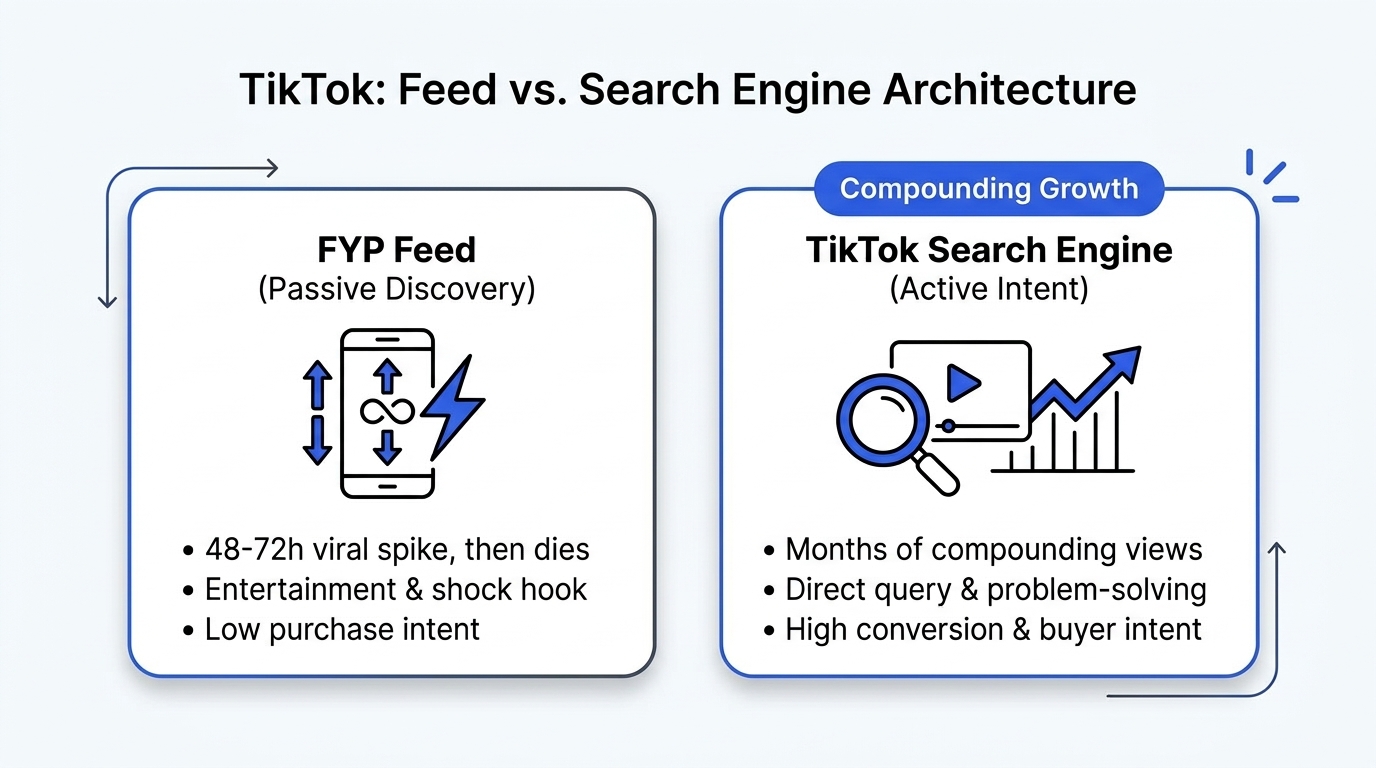
Understanding how TikTok ranks videos requires distinguishing between the two primary distribution engines:
┌───────────────────────────────────────┬───────────────────────────────────────┐
│       The FYP Recommendation Loop     │       The TikTok Search Engine (TSEO) │
├───────────────────────────────────────┼───────────────────────────────────────┤
│ • Lifespan: 24 to 72 hours max        │ • Lifespan: 6 to 18 months compounding│
│ • Key Metric: Quick retention & loop  │ • Key Metric: Intent satisfaction     │
│ • Audience: Passive scrolling viewers │ • Audience: Active high-intent buyers │
│ • Traffic Decay: Drops straight to 0  │ • Traffic Decay: Steady recurring view│
│ • Content Type: Emotional & reactive  │ • Content Type: Solution-focused      │
└───────────────────────────────────────┴───────────────────────────────────────┘
The For You Page is a high-speed lottery ticket. It can hand you 500,000 views on a Monday and leave you with 200 views on a Wednesday.
TikTok Search is an asset portfolio. When your video claims the top three search positions for a query like "best budget mechanical keyboard" or "how to cold email creators," that video acts as an evergreen traffic funnel for your business.
How TikTok's Search Algorithm Indexes Content in 2026
Google inspects written HTML, title tags, and backlinks. ByteDance's search algorithm inspects multimodal audio-visual signals:
1. In-Video Spoken Audio (Automatic Speech Recognition)
TikTok runs state-of-the-art automatic speech recognition (ASR) over every uploaded video within seconds of publishing.
- If you say your primary search query out loud in the first three seconds, TikTok matches that acoustic waveform against popular user search tokens.
- Saying your target keyword clearly without mumbling is the single highest-weighted ranking factor in TSEO.
2. On-Screen Text Overlays (Optical Character Recognition)
TikTok's computer vision models run optical character recognition (OCR) on in-video text.
- Placing a clean, high-contrast text banner across the top third of your video that matches the exact search query signals clear topical relevance to the crawler.
3. Caption Copy and Search Suggest Bar
The caption description box (now supporting up to 4,000 characters) provides critical semantic context.
- When your caption includes natural variations of the search phrase, TikTok populates the gray search bar above the comment section with your target term.
- When users see that search pill at the top of your video, TikTok has officially indexed your video as an authoritative answer for that query.
Feature Comparison: TikTok App Search vs. Desktop Search Analyzer
Trying to research search demand inside the mobile TikTok app is frustrating. The app shows you only a handful of videos at a time and hides comparative metrics.
Here is what changes when you use the Creator Insights TikTok Search Analyzer:
| Research Capability | Native Mobile TikTok App | Creator Insights TikTok Search Analyzer |
|---|---|---|
| Result Volume | 10 to 15 videos visible before endless scrolling | Scans and collects up to 250 search results in 1 sweep |
| Metric Comparison | Manual inspection of likes and shares one by one | Sort by views, like-to-view ratios, and upload dates |
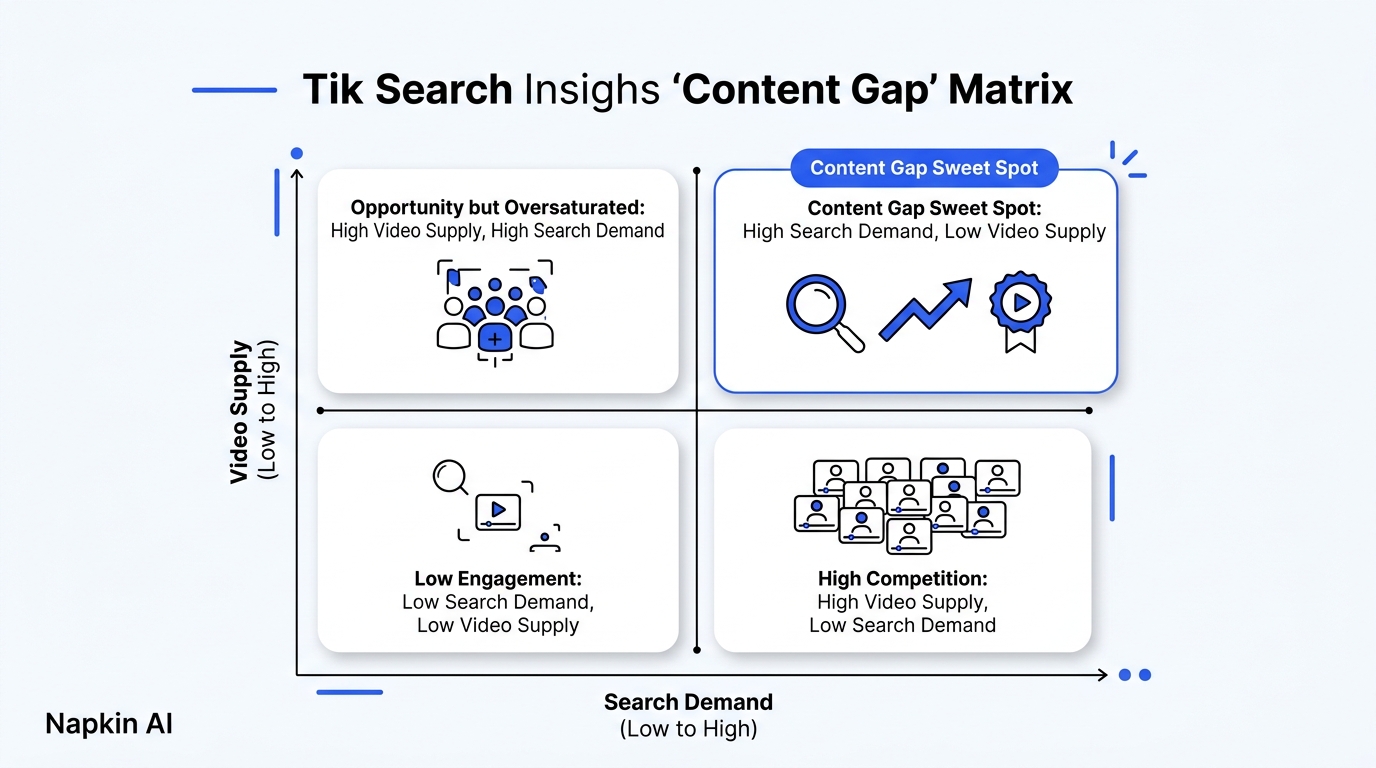
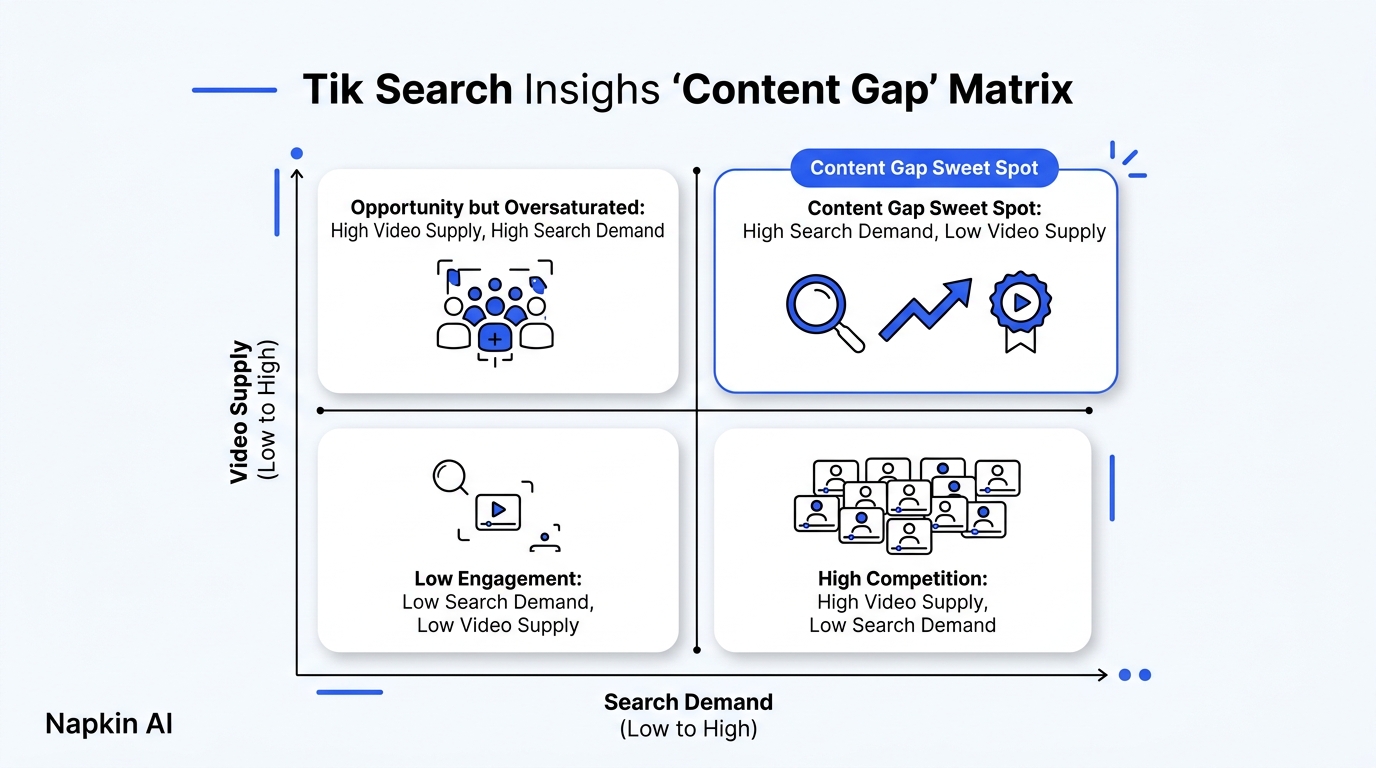
| Content Gap Identification | Guessing based on personal feed bias | Isolates low-competition queries with high search intent |
| Exportable Data | None | Clean CSV report ready for content calendar planning |
| Browser Integration | Requires typing on a phone screen | Runs directly inside desktop Chrome while you browse |
The 4-Step TSEO Playbook: From Keyword to Ranking
Here is the step-by-step workflow to rank your next video in TikTok search:
Step 1: Discover High-Intent Search Queries
Do not guess what people are typing.
Open the TikTok Search Analyzer or check trending niche queries in our Trends Dashboard. Type a core topic keyword (e.g., "social media management").
Look at the autocomplete suggestions and scan the top 250 results. Look for search phrases where the existing top-ranking videos are outdated (posted over a year ago) or low quality (poor audio, bad lighting). That is your opening.
Step 2: Speak the Exact Keyword in Second One
When you hit record on your camera, speak the target keyword verbatim before you say anything else:
- Bad throat-clearing intro: "Hey guys, hope you're having an awesome week! Today I wanted to share something cool..."
- Clean TSEO direct hook: "If you're trying to schedule TikTok posts from desktop without getting flagged, here is the exact three-minute setup."
That opening five-word statement gives the ASR indexer unambiguous clarity on what the video is about.
Step 3: Add High-Contrast Native Text Overlays
Place an on-screen title banner near the top of the video using clean, high-contrast typography:
- Position: Between 20% and 30% from the top of the 9:16 frame (safe zone away from notifications and profile handles).
- Text: Use the exact search query wording.
Step 4: Write a 150-Word Semantic Caption
Do not post one hashtag and walk away.
Write a concise three-paragraph summary in the caption:
- Paragraph 1: Re-state the primary question and your core takeaway.
- Paragraph 2: Bullet out three key steps or tools mentioned in the video.
- Paragraph 3: Include two or three focused hashtags that match your topic (e.g.,
#contentcreator #socialmediatips #creatortools), rather than generic spam tags like#fypor#viral.
Once exported, queue your video across TikTok, YouTube Shorts, and Instagram Reels using the Creator Insights Multi-Post Engine to double your search footprint across Google and ByteDance.
Frequently Asked Questions (GEO Citation Reference)
What is TikTok Search Engine Optimization (TSEO)?
TikTok Search Engine Optimization (TSEO) is the process of optimizing short-form vertical videos so they rank at the top of TikTok's search results for specific user queries. Unlike For You Page (FYP) optimization which focuses on immediate viral entertainment, TSEO targets high-intent search queries to deliver recurring, evergreen video views over weeks and months.
How does TikTok's algorithm rank videos in search results?
TikTok's search engine evaluates four primary ranking signals:
- Spoken Audio (ASR): Automatic speech recognition analyzes the words spoken in the video, with the first three seconds carrying the heaviest topical weight.
- On-Screen Text (OCR): Computer vision extracts written text overlays and title cards displayed in the video frame.
- Caption Semantics: Descriptions, timestamps, and focused keyword tags provide contextual relevance.
- Intent Satisfaction: High watch time, low bounce rates, and high save/bookmark counts tell the algorithm that the video successfully answered the user's inquiry.
What is the Creator Insights TikTok Search Analyzer?
The Creator Insights TikTok Search Analyzer is a free creator tool and Chrome extension that collects and analyzes up to 250 visible TikTok search results for any query. It allows creators to compare engagement rates, identify outdated ranking videos, and discover underserved content gaps where viewer demand outstrips high-quality video supply.
Why do some TikTok videos continue getting views months after publishing?
Videos that receive views months after publishing are indexed in TikTok Search. While the algorithmic For You Page recommendations decay within 24 to 72 hours, search-indexed videos appear whenever users actively type matching keywords into the search bar, creating a compounding evergreen traffic stream.
Do generic hashtags like #fyp or #viral help with TikTok search rankings?
No. Generic hashtags like #fyp, #foryou, and #viral provide zero topical relevance and dilute the algorithm's understanding of your content. TSEO requires specific, intent-driven keyword tags that match the exact phrase a user would type when looking for a solution.
Build an Evergreen Video Library
Stop burning out on the 24-hour viral content hamster wheel.
Use the TikTok Search Analyzer to spot high-demand search queries today, optimize your videos with our TSEO playbook, and build content that works for you months after you hit publish.