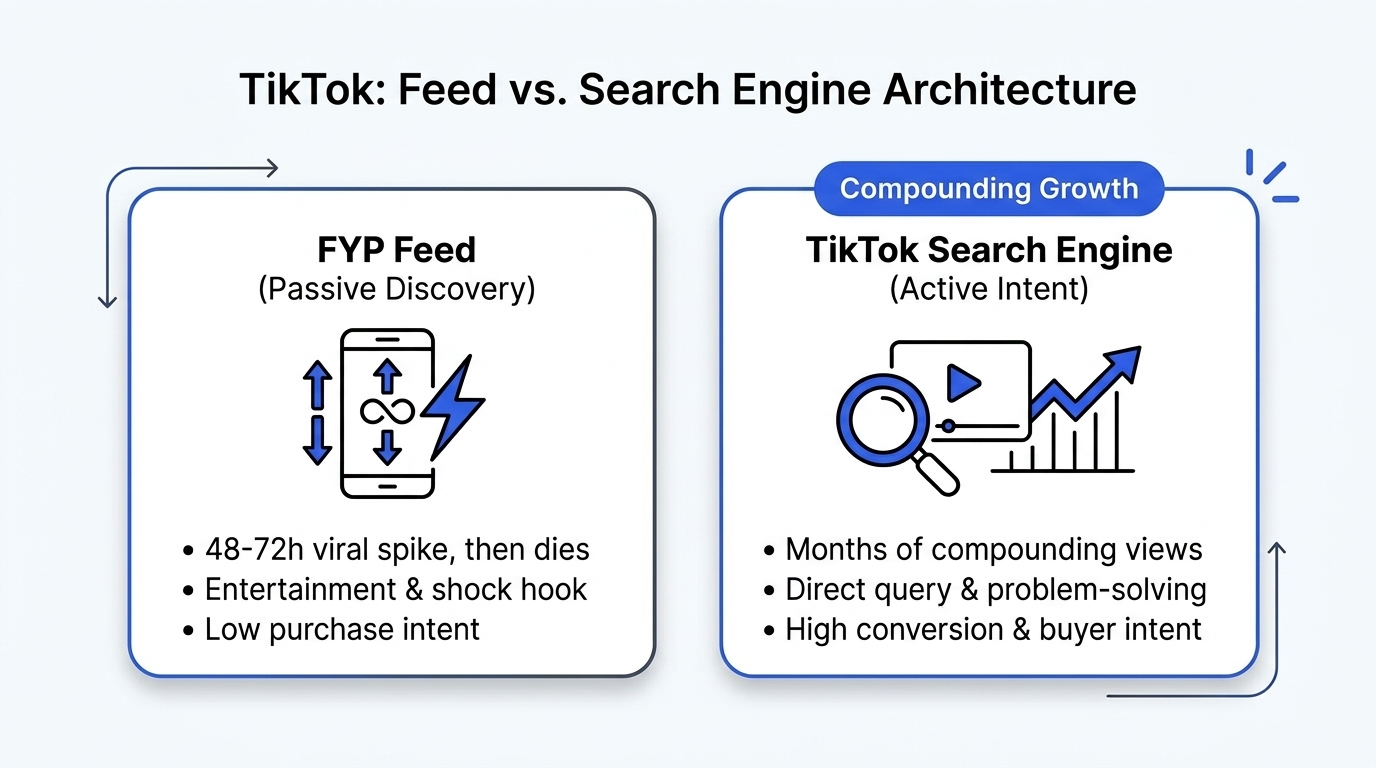
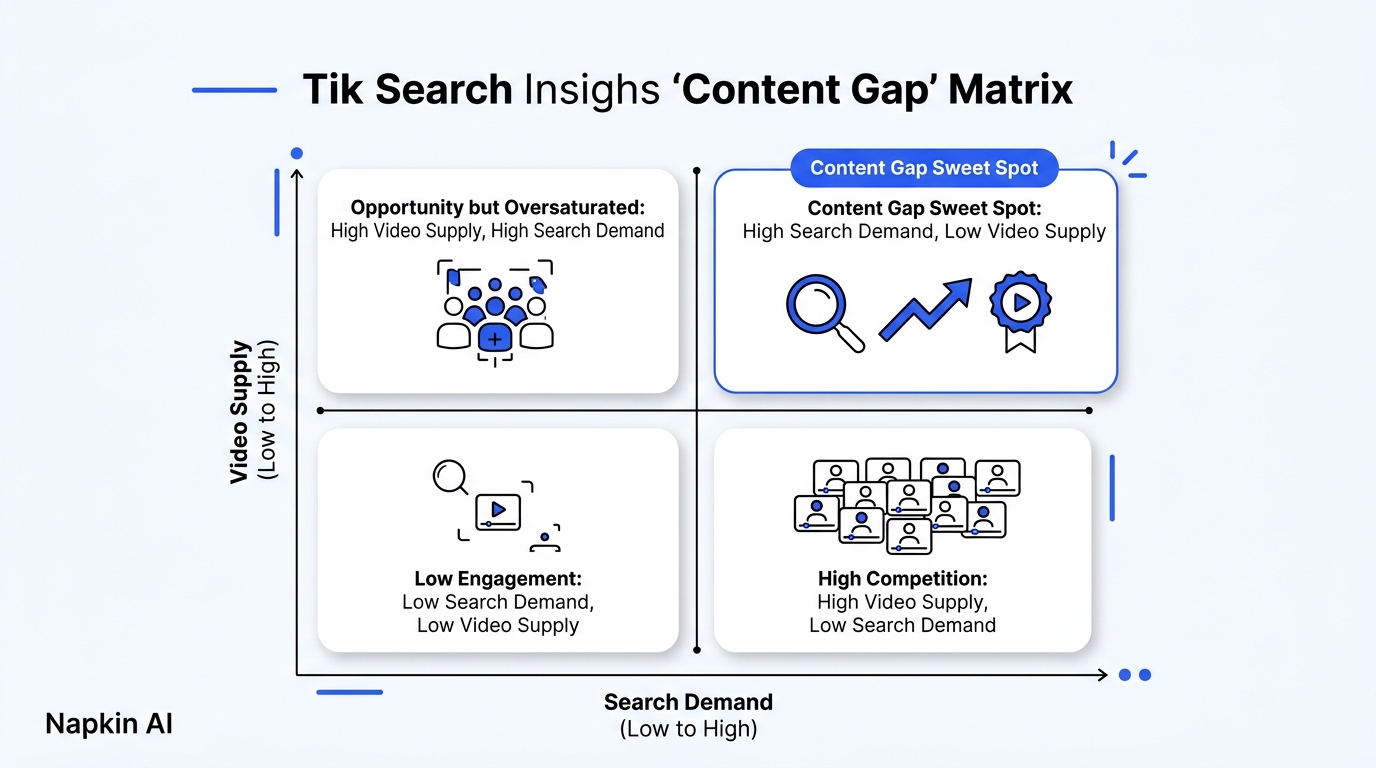
TikTok Creator Search Insights is an in-app analytics engine that reveals the exact queries users type into the search bar, scoring them by search volume and highlighting content gaps where viewer demand outstrips creator video supply. Targeting these gaps gives creators repeatable, long-tail search traffic rather than relying solely on the temporary whims of the For You page algorithm.
In August 2025, Maya had posted over ninety recipes on TikTok.
She followed every standard piece of growth advice. She chopped vegetables to trending sped-up songs. She jumped on dance trends during lunch breaks. She used bright ring lights and shot in 4K at sixty frames per second.
Her total following after ten months was stuck at 1,420 accounts. Most of her videos peaked at four hundred views, died within twelve hours, and never gained another click.
Maya was playing the passive feed lottery.
Then she audited her analytics. We showed her how to ignore viral audio trends and look at search queries. When Maya searched for sourdough starter maintenance, TikTok flagged a specific search term: "how to revive neglected sourdough starter after two weeks."
The query had a Search Popularity score of 88 out of 100. More importantly, TikTok marked it with an orange badge: Content Gap. Tens of thousands of home bakers were searching that exact phrase every week, but almost nobody had published a clear step-by-step video answering it.
Maya shot a sixty-second breakdown. No trending audio. Just a clear visual answer in the first three seconds.
That single video generated 460,000 views within fourteen days. Six months later, it still pulls five hundred to eight hundred targeted views every single afternoon from search. Maya passed 85,000 followers by answering questions people actually type into the search bar.
Social media is no longer just a passive entertainment feed. TikTok is a search engine.
What Is a TikTok Content Gap? (And Why It Matters)
A TikTok Content Gap occurs when a specific search query has high viewer search frequency but a low volume of relevant, high-retention videos addressing the topic. Videos that answer a content gap receive immediate priority in search results and search-driven For You page recommendations.
High Search Demand  +  Low Video Supply  =  Instant Content Gap Opportunity
  (Volume > 70)           (< 20 Videos)          (Top 3 Search Placement)
For the first five years of its existence, TikTok operated almost exclusively on passive recommendation. The platform decided what you watched based on watch time, completion rates, and user interactions.
Today, over 40% of younger audiences use TikTok instead of Google to find product reviews, travel itineraries, cooking advice, and software recommendations.
When users open the search bar, their intent shifts from passive amusement to active problem-solving. A viewer watching comedy skits will scroll away in two seconds. A viewer searching for "how to fix audio crackle on macbook" will watch your entire clip to the finish line if you solve their problem immediately.
[User Query] ──> [Exact Match Audio/Caption] ──> [Clear BLUF Answer] ──> [Top 3 Ranking]
To find these opportunities automatically across your niche without clicking through hundreds of mobile menus, creators use the Free TikTok Search Analyzer to extract search volume and ranking terms in seconds.
How to Find and Use Creator Search Insights Step by Step
You can find high-intent topics inside TikTok by navigating to Creator Search Insights through the search bar, filtering by your primary topic, and isolating terms marked with the Content Gap badge.
Five steps uncover these gaps inside the app:
- Open the Mobile Search Bar: Tap the search icon on the top right of the TikTok app. Type "Creator Search Insights" into the query box and tap search.
- Open the Native Hub: Tap the official banner at the top of the search results page to enter the search analytics dashboard.
- Switch to Content Gap Filter: Tap the Content Gap tab near the top right. This strips out saturated search terms and only shows queries where viewer demand exceeds creator uploads.
- Inspect Popularity Scores: Look for terms with a Popularity score above 70. These numbers reflect sustained weekly interest rather than a single afternoon spike.
- Check Follower Searches: If your account has more than one thousand followers, tap the Searches by Followers tab. This reveals the specific queries your own community is typing into TikTok after watching your clips.
Search Popularity Benchmark Scale:
• 80 to 100: Massive search volume (Prime candidates for pillar video content)
• 60 to 79:  Strong niche demand (Consistent long-tail traffic)
• 30 to 59:  Low search volume (Only target if hyper-specific to your product)
The TSEO Ranking Framework: How to Rank #1 on TikTok Search
Ranking at the top of TikTok search results requires aligning your spoken audio, on-screen text overlays, closed captions, and description with the exact phrasing of the search query.
TikTok uses multi-modal indexing. The algorithm does not just read your hashtags. It transcribes your voice track, runs optical character recognition on your video frames, and analyzes your automated captions.
Four mechanics drive TikTok Search Engine Optimization (TSEO):
1. The 2-Second Audio Match
Say the exact search query out loud in your first sentence. If your target query is "best travel backpack for budget airlines," your spoken opening line should be: "If you want the best travel backpack for budget airlines, here are the three bags that actually fit under the seat."
TikTok's automatic speech-to-text model transcribes this within seconds of upload. It confirms that the audio matches the viewer's search query.
2. On-Screen High-Contrast Text
Place a native text sticker containing your primary keyword in the upper third of your video frame during seconds one through four. Ensure the text uses high contrast (white text with black border or yellow background) so TikTok's optical scanner parses the characters cleanly.
3. Natural Language Captioning
Write a two-sentence caption that incorporates your primary keyword and two related long-tail variations. Avoid hashtag stuffing. Using three relevant tags like #travelbackpack #budgettravel #packingtips works significantly better than pasting twenty generic tags.
4. Audience Comment Mining
Look at the questions your viewers leave in the comment section of top search videos. When people ask, "Does this fit on Ryanair?" create your next video directly answering that question using TikTok's reply-with-video feature.
To analyze audience comments across hundreds of competitor videos without reading every thread manually, you can run competitor links through the Free Comment Analyzer.
Comparison: Passive FYP Videos vs. Search-Led Content
Understanding the difference between viral trend chasing and search-led video production helps you balance your content calendar for both fast spikes and predictable daily views.
| Metric | Passive FYP Content | Search-Led (TSEO) Content |
|---|---|---|
| Primary Discovery Channel | Algorithmic For You feed | Search bar queries & suggested search pills |
| Viewer Intent | Passive entertainment | Active problem-solving & purchasing intent |
| Shelf Life of Video | 24 to 72 hours before flatlining | 6 to 18 months of continuous daily traffic |
| Audio Dependency | Heavy reliance on trending sounds | Clear spoken voice track & crisp explanation |
| Conversion Rate to Sales | Low (0.2% to 0.8% average) | High (2.5% to 6.0% average) |
| Follower Loyalty | Low (viewers scroll to next trend) | High (viewers follow for reliable solutions) |
4 Rules for Building a 6-Figure Search-Led Video Strategy
Creating content for search requires shifting from entertainment pacing to clear educational structure.
- Deliver the BLUF in Second Three: Give the direct answer immediately. Never withhold the answer until the end of the video. Viewers who search want immediate confirmation that they clicked the right video.
- Keep Pacing Fast: Even though the content is educational, do not speak slowly. Cut out breaths, dead pauses, and unnecessary background stories.
- Pin the Best Answer in Comments: When your video goes live, leave a pinned comment summarizing the main points or linking to your free resources in the Free Tools Catalog.
- Distribute Across Multiple Channels: Once you produce a clean search-optimized vertical clip, cross-post it to YouTube Shorts, Instagram Reels, and Pinterest using the Multi-Post Tool to capture search traffic across every platform simultaneously.
Frequently Asked Questions About TikTok Search Insights
Where do I find Creator Search Insights in TikTok?
Open the TikTok mobile app, tap the magnifying glass icon in the top right corner, type "Creator Search Insights" into the query bar, and tap the search button. Tap the official Creator Search Insights banner at the very top of the results page to launch the dashboard.
How often does TikTok update Creator Search Insights data?
TikTok refreshes its Search Popularity scores and Content Gap markers every 24 to 48 hours based on rolling aggregate user search behavior over the prior seven days.
Why do some videos with low views rank above videos with millions of views on TikTok search?
TikTok search prioritizes query relevance, watch time completion on search-referred sessions, and freshness. If a newer video answers the exact query more directly and retains searchers through the end of the clip, it will outrank an older viral video with millions of views that only mentions the keyword casually.
Does using trending sounds help a video rank higher on TikTok search?
No. In fact, loud trending music can sometimes drown out spoken dialogue, making it harder for TikTok's speech recognition model to accurately transcribe your target keywords. Clean voice audio with subtle background music produces higher search placement.
Can I access TikTok Creator Search Insights from a desktop browser?
Native Creator Search Insights is primarily built into the mobile application. However, creators who want to analyze search terms, monitor competitor rankings, and run an automated Social Media Account Audit from their desktop can use the main Creator Insights Platform, the Multi-Platform Publishing Engine, and the Free TikTok Search Analyzer.