Auto-posting across all major social networks without running into upload throttles requires shifting away from legacy cloud APIs toward authenticated browser-session distribution. Cloud schedulers break down on walled gardens like TikTok, Threads, and Reddit because those networks deliberately restrict public developer endpoints to protect ad ecosystems.
Last winter, I watched an agency client lose forty hours in one week.
They ran three creator brands. Every afternoon, an assistant sat at a dual-monitor workstation with fifteen Chrome tabs open. They manually dragged 4K video exports into TikTok web, re-entered captions for Instagram Reels, uploaded to YouTube Shorts, and copy-pasted text into LinkedIn, X, and Pinterest.
Halfway through the week, two of their scheduling accounts got flagged for API spamming. Video bitrates dropped down to blurry 720p. The assistant wanted to quit.
The culprit was not bad planning. The culprit was relying on legacy cloud schedulers that treat social distribution like sending emails.
Here is the exact technical breakdown of why traditional multi-posting fails, and how modern browser automation solves cross-platform distribution permanently.
Why Legacy Cloud Schedulers Break on Modern Social Networks
Cloud scheduling tools fail because major social platforms intentionally restrict developer APIs to prevent headless bot farms.
Meta, ByteDance, and X do not want third-party servers pumping millions of scheduled video files through public cloud endpoints. They want human engagement inside their native interfaces. As a result, standard developer APIs come with brutal restrictions that cripple organic reach:
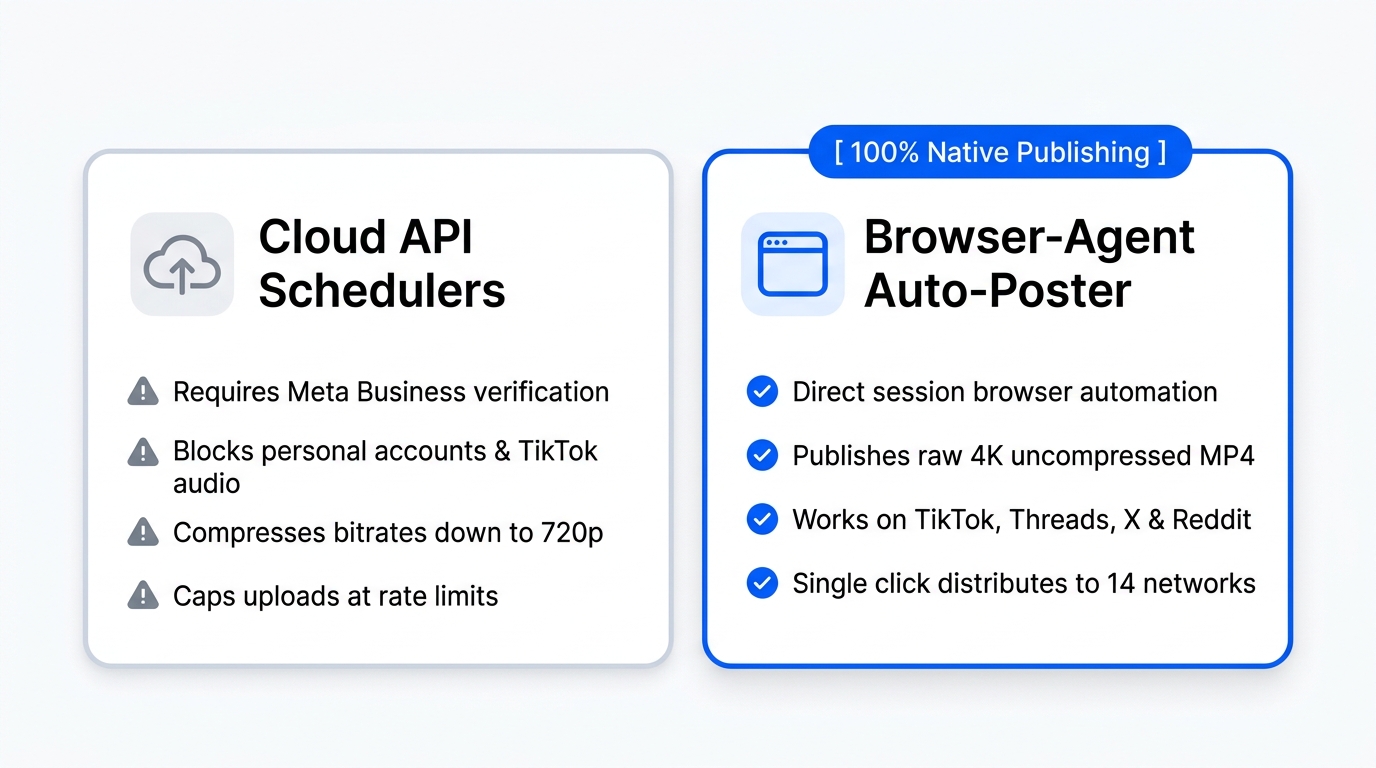
- Strict Developer Tier Audits: Meta requires complex Business Manager verification just to publish a single Reel through the Graph API.
- Audio Stripping on TikTok: Cloud API uploads cannot access trending commercial sounds, cutting off viral algorithmic distribution loops.
- Severe Bitrate Compression: Cloud servers re-encode your 60 Mbps master video file down to sub-10 Mbps files to save server bandwidth.
- Walled Garden Exclusions: Platforms like Threads, Reddit communities, and personal LinkedIn profiles offer zero automated posting APIs to public software vendors.
When tools tell you they post to twelve networks, read the fine print. You usually end up scheduling three networks automatically, while receiving push notifications on your phone to upload the rest by hand.
| Publishing Dimension | Traditional Cloud API Schedulers | Browser-Agent Auto-Posting |
|---|---|---|
| Network Coverage | 4–6 platforms (requires business accounts) | 14 platforms simultaneously (personal & creator accounts) |
| Video Quality Preservation | Re-compressed to 720p / 1080p low-bitrate | Bit-for-bit native master file delivery (4K 60fps) |
| Trending Audio Access | Blocked by API license agreements | Fully unlocked via native interface selector |
| Account Suspension Risk | High when cloud IP pools get flagged | Minimal (uses your authenticated residential session) |
| Upload Speed | Batched cloud cron jobs with 15-minute drift | Real-time immediate or precise browser triggers |
The Mechanics of Browser-Agent Distribution
Browser-agent auto-posting works by running direct, authenticated sessions inside your existing web browser rather than calling remote cloud webhooks.
Instead of handing your login credentials to a third-party server in Virginia, a lightweight extension acts as an executive assistant on your local machine. You stay logged into your native social web apps: TikTok Web, Instagram Creator Studio, YouTube Studio, LinkedIn, and Threads.
When you drop a master video into Creator Insights Multi-Poster, the system coordinates the release:
- Format Adapting: The software verifies aspect ratios, caption lengths, and network-specific tag limits in one central dashboard.
- Local Session Execution: The browser extension mounts the native upload drawer on each target platform through your verified local cookie.
- Native Direct Upload: The master video uploads straight from your hard drive to the platform's official ingestion endpoint, bypassing third-party compression entirely.
Because the request originates from your own residential IP address and authenticated session, algorithms register the post as an authentic human upload.
Step-by-Step: Setting Up 14-Platform Publishing
You can automate your entire weekly distribution schedule in four straightforward steps without touching complex developer tokens.
1. Ingest Master Media Into the Canvas
Drop your finished vertical video file directly into the Creator Insights Multi-Post canvas. Keep your file under 250 MB and maintain standard 1080x1920 or 2160x3840 canvas resolution.
2. Craft Platform-Specific Metadata
Different platforms demand distinct writing formats. A long-form carousel caption that generates 400 comments on LinkedIn will look absurd on TikTok.
- TikTok & Instagram: Lead with a punchy 2-line hook and 4 targeted niche tags.
- YouTube Shorts: Include a keyword-rich title under 60 characters with
#Shorts. - LinkedIn & X: Provide full context paragraphs and conversation starters.
3. Queue Distribution Slots
Select your publishing window. Rather than firing off 14 uploads at the exact same second, add a 90-second jitter delay between channels. Spacing out requests prevents fraud detection algorithms from mistaking rapid-fire submissions for brute-force scripting.
4. Let the Browser Extension Fire
Click dispatch. Keep your browser open while the extension runs the native uploads in the background. In under four minutes, your content is live across every target channel.
Frequently Asked Questions
Will auto-posting through software lower my video reach?
No. Content reach is determined by watch time, completion rate, and share velocity, not the tool used to hit the publish button. Using browser-level distribution ensures your video is ingested as a native web upload with full 4K visual fidelity, preventing the compression penalties associated with legacy cloud APIs.
Which 14 social networks can I publish to with Creator Insights?
The system distributes vertical and horizontal content across Instagram (Reels and Feed), TikTok, YouTube Shorts, LinkedIn (Personal and Company Pages), X, Facebook Pages, Pinterest, Threads, Reddit, Substack Notes, and Bluesky from one unified workspace.
How does browser-agent publishing prevent account bans?
Browser-agent automation uses your authenticated local browser cookies and residential IP address, unlike cloud schedulers that push thousands of posts through shared datacenter IP blocks. Because uploads occur within standard web interfaces, platforms recognize the activity as standard creator usage.
Can I schedule posts to personal social profiles?
Yes. Official developer APIs strictly require Meta Business accounts and verified corporate credentials. Browser automation uploads directly through your active browser session, allowing you to publish freely to personal creator profiles on Instagram, Threads, and LinkedIn without corporate business verification.
What is the maximum video file size supported for multi-posting?
Creator Insights supports raw video files up to 1 GB for desktop browser publishing. However, we recommend exporting master 9:16 vertical MP4 files between 50 MB and 150 MB at 1080p or 4K 60fps to balance pristine visual clarity with rapid upload speeds across multiple browser tabs.