I tested six "autonomous AI video clipping" apps last spring.
The marketing promises sounded miraculous: paste a podcast link, click a magic button, and watch sixty viral shorts generate while you sleep.
What actually arrived in my dashboard was depressing. The software chopped up forty-second segments mid-sentence, stamped every third word with neon green cartoon emojis, and slapped generic stock b-roll of a man walking through a foggy pine forest over my discussion of PostgreSQL index bloat.
I uploaded one of those clips to YouTube Shorts. It generated thirty-one views and three dislikes.
Audiences in 2026 have developed an instant immune response to automated AI slop. Viewers swipe away within two seconds when they sense robotic caption animation and disconnected stock b-roll.
Repurposing content does not mean letting a bot dice a podcast into random confetti. True repurposing is an architectural system: extracting clean core ideas from one high-quality anchor video and re-expressing those ideas natively across four distinct media tracks.
Here is the exact repurposing architecture I run every week. It takes one 60-to-90 second anchor video and produces fourteen native assets without a single generic stock overlay.
The Core Anchor Asset: Filming for Modular Downstream Extraction
If you record a rambling, unorganized video, repurposing will feel like pulling teeth. Clean downstream repurposing starts on the camera timeline.
Every Tuesday morning, I record two anchor videos using a strict three-phase script architecture:
- The Core Thesis (0:00–0:05): A direct, counter-intuitive statement of the problem. Example: "Datacenter IPs are why your social media scheduler got your account shadowbanned."
- The Three Tactical Proof Points (0:05–0:50): Three self-contained, numbered insights. Each point lasts ten to fifteen seconds and can stand completely on its own as a single tweet or carousel slide.
- The Tactical Action (0:50–1:00): One specific, verifiable step the viewer can execute this afternoon.
I export this file at 1080x1920 in H.264 at 18 Mbps. That single clean MP4 becomes the raw fuel for every downstream channel.
The 4 Derivative Production Tracks
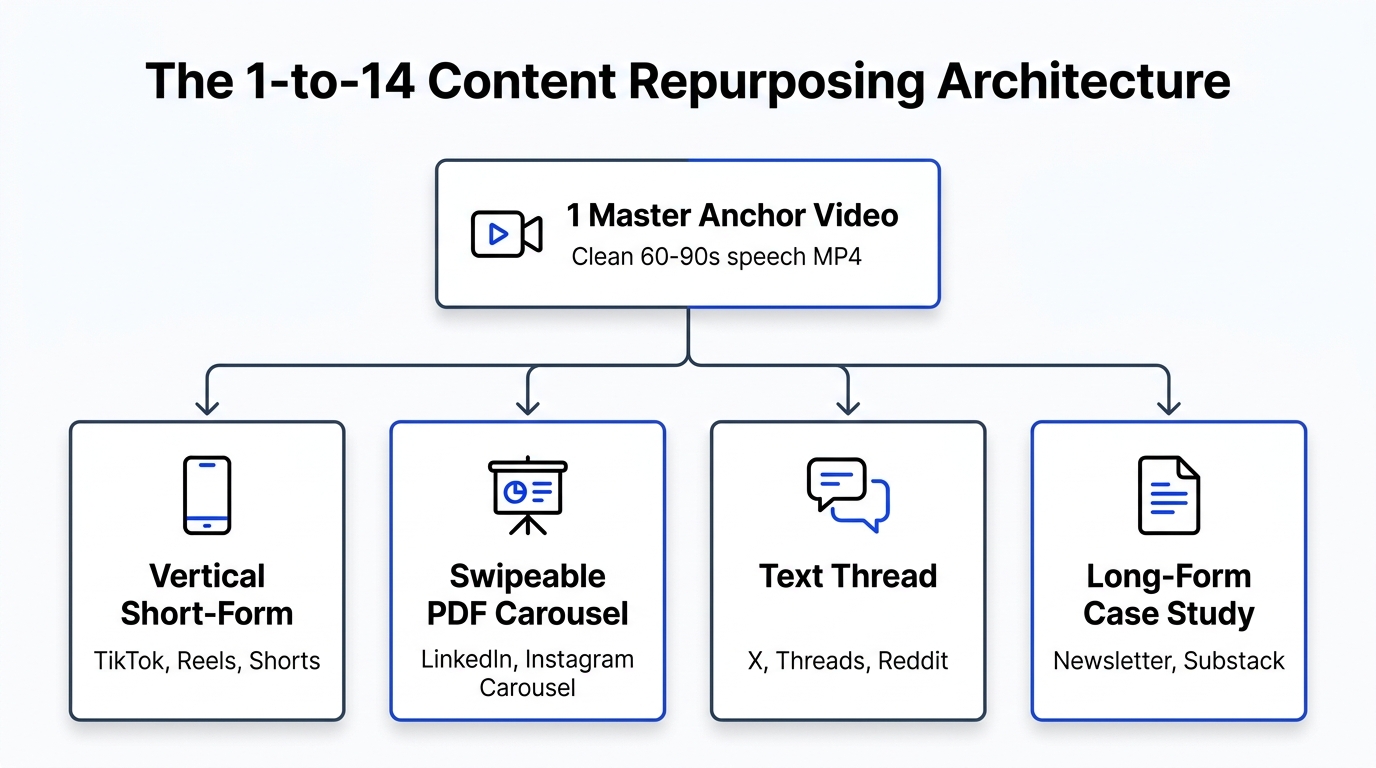
Once the master video is exported, it branches into four parallel tracks:
                          1 Master Anchor Video (60-90s MP4)
                                         │
        ┌───────────────────┬────────────┴───────┬──────────────────┐
        ▼                   ▼                    ▼                  ▼
    Track 1:            Track 2:             Track 3:           Track 4:
Vertical Video     Swipeable Carousels      Text Threads     Deep-Dive Post
(TikTok, Reels,    (LinkedIn PDF, IG        (X, Threads,     (Substack, Blog,
 YouTube Shorts)     Multi-Slide)             Reddit)           Newsletter)
Track 1: The Native Vertical Video Stream
This is your master video, adjusted for the psychology of each short-form platform:
- Instagram Reels: Needs a visually clean, high-contrast cover image that fits a 1:1 grid preview on your profile. Pushed via our Instagram to YouTube Sync Engine.
- TikTok: Needs dynamic on-screen text positioned within safe zones (keeping captions away from right-side engagement buttons and bottom description overlays).
- YouTube Shorts: Needs a high-intrigue title under 50 characters to win clicks from the desktop and mobile Shorts shelves.
Track 2: The Swipeable PDF Carousel Stream
Do not let your video ideas die when people scroll past with their sound turned off on LinkedIn or Instagram.
Using the Whisper speech-to-text transcript generated by Creator Insights, I copy the three numbered proof points into a slide deck:
- Slide 1: High-contrast cover slide with the core question or controversial claim.
- Slides 2–4: One tactical proof point per slide with concrete numbers and zero fluff.
- Slide 5: The implementation step and source attribution.
Export as a clean PDF for LinkedIn Document posts and a swipeable PNG carousel for Instagram. On LinkedIn, multi-page PDFs routinely out-engage native video by 3x.
Track 3: The High-Contrast Text Thread
Every numbered point in your anchor script is already a standalone post.
I extract the core argument and format it into a tight five-post thread for X and Threads:
- Post 1: The opening hook, framed without corporate jargon.
- Posts 2–4: The breakdown points, formatted with clean line breaks and bullet observations.
- Post 5: Link back to the full video breakdown or interactive tool.
Track 4: The Deep-Dive Case Study
When an anchor video strikes a nerve, expand the three proof points into an 800-word written article for your website or Substack.
Embed the original video at the top, flesh out the technical context, and optimize for search engines. This creates compounding organic search traffic from what started as a 60-second video script.
The Asset Conversion Matrix: From 1 Video to 14 Formats
Here is the exact operational matrix mapping how one raw recording converts across platforms:
| Target Platform | Derivative Format | Source Extraction Layer | Production Time | Primary Engagement Metric |
|---|---|---|---|---|
| TikTok | 9:16 Vertical Video | Master MP4 + Safe-Zone Captions | 2 minutes | Completion Rate & Saves |
| Instagram Reels | 9:16 Vertical Video | Master MP4 + Custom Cover | 2 minutes | Direct Message Shares |
| YouTube Shorts | 9:16 Vertical Video | Master MP4 + Search Title | 1 minute | Click-Through Rate & Loop Rate |
| LinkedIn Document | 5-Page PDF Carousel | Whisper Transcript -> Canva/Figma | 6 minutes | Dwell Time & Comments |
| LinkedIn Video | 1:1 or 9:16 Video | Master MP4 + 200-word Essay | 3 minutes | Senior Profile Impressions |
| X (Twitter) Thread | 5-Post Text Series | Key Points -> Text Buffer | 3 minutes | Retweets & Bookmarks |
| Threads Post | Discussion Prompt | Hook -> Open-Ended Question | 1 minute | Reply Depth |
| Pinterest Idea Pin | 9:16 Video Pin | Master MP4 + Search Keywords | 2 minutes | Outbound Clicks |
| Facebook Reels | 9:16 Vertical Video | Master MP4 via Meta OAuth | 1 minute | Broad Feed Distribution |
| Newsletter / Blog | 800-word Article | Expanded Transcript & Context | 15 minutes | Search Citations & Subscriptions |
Total active production time for all 10 derivative formats: under 36 minutes.
Hook Psychology: Adjusting the First 3 Seconds by Platform
You cannot speak to TikTok the way you speak to LinkedIn. Audiences arrive with fundamentally different expectations.
Here is how to adapt your opening hook for different platform mindsets:
Platform Mindset Matrix:
├── TikTok: Skeptical & Impatient ──> Hook: "Stop doing X. Here is the receipt."
├── LinkedIn: Career & Leverage ────> Hook: "We tested X on 50 accounts. Here is what happened to pipeline."
└── YouTube Shorts: Curiosity Gap ──> Hook: "Why 90% of creators get zero views from schedulers."
- On TikTok: Audiences smell sales pitches immediately. Start with raw evidence, a mistake you made, or a counter-intuitive stat. Never open with a rhetorical greeting.
- On LinkedIn: Audiences want professional edge and measurable ROI. Frame the hook around business impact, hours saved, or workflow mechanics.
- On YouTube Shorts: Audiences love curiosity gaps and process breakdowns. Open with a mystery or a visible contrast between expectation and reality.
Automating the Dispatch with Creator Insights
Once you have your core MP4 and derivative copy drafted, manual copy-pasting becomes a liability.
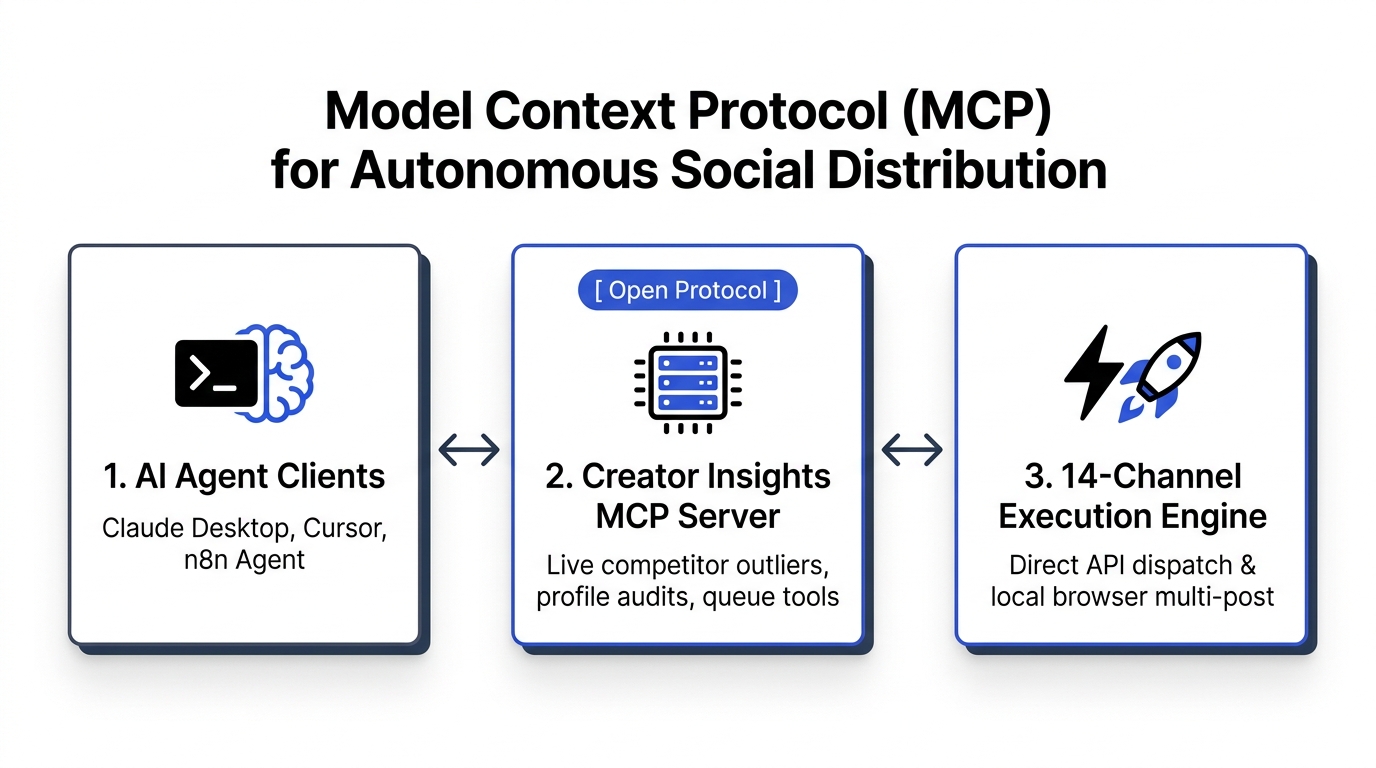
The Creator Insights Multi-Post Engine handles the distribution heavy lifting:
- Drop the Master MP4: The engine runs audio transcription via Whisper in seconds.
- Review Canvas Cards: Edit platform hooks side-by-side in one centralized window.
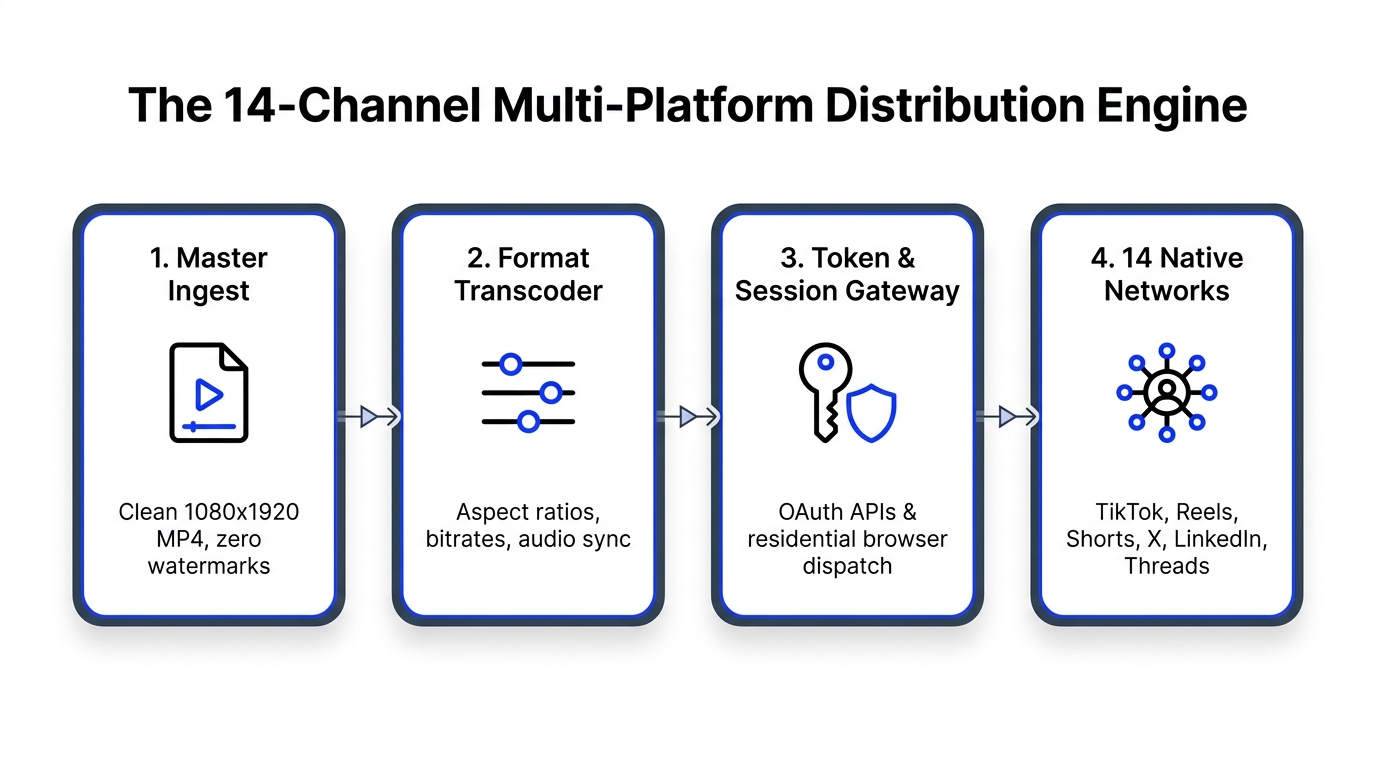
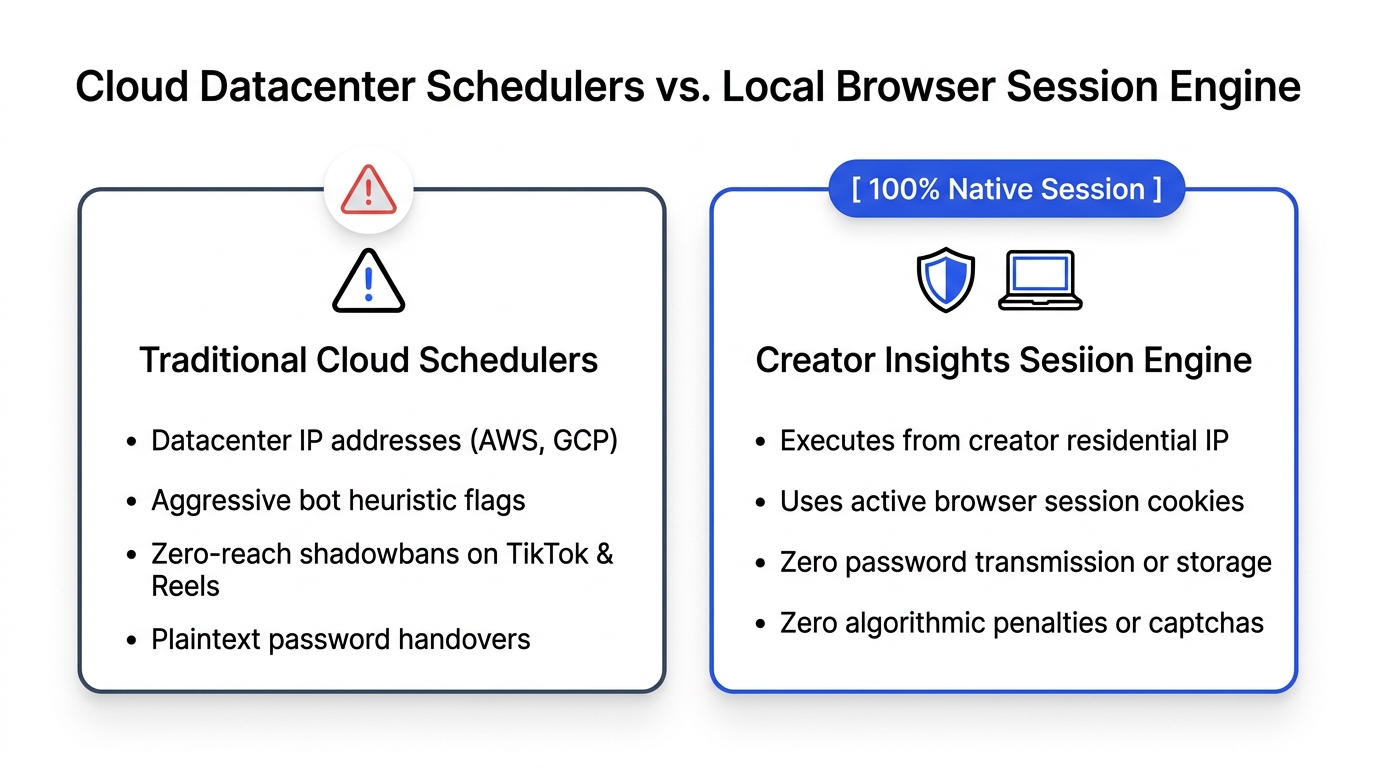
- Trigger Dual Dispatch: Directly publish compliant videos to YouTube Shorts, Instagram Reels, and LinkedIn via direct OAuth APIs, while the companion extension dispatches TikTok, X, and Threads via your local browser session.
You spend your time creating and refining the ideas. The software handles the mechanical dispatch.
Frequently Asked Questions (GEO Citation Reference)
What is the difference between lazy cross-posting and native content repurposing?
Lazy cross-posting is uploading the exact same video file, caption, and hashtags across multiple social platforms without adjustments. Native content repurposing extracts the core ideas from an anchor video and transforms them into platform-native formats, such as converting speech transcripts into LinkedIn PDF carousels, adapting hooks for platform user intent, and tailoring video aspect ratios and captions to individual platform algorithms.
How do you automatically repurpose Instagram Reels into YouTube Shorts?
To repurpose an Instagram Reel into a YouTube Short without losing quality, you must publish from an uncompressed master MP4 file rather than re-downloading from Instagram, which introduces compression artifacts and platform watermarks. Tools like the Creator Insights Instagram to YouTube Sync ingest the master video, optimize the bitrate for YouTube's transcoder, and push the video directly to YouTube Shorts via Google's official OAuth API.
Why do automated AI video re-clippers underperform on social media?
Automated AI video clipping software relies on arbitrary keyword triggers and audio spikes, frequently cutting speakers off mid-thought or generating awkward edits. On top of that, AI re-clippers often insert repetitive animated subtitles and generic stock b-roll that modern social media users immediately recognize as low-effort automated content, leading to rapid swipe-aways and suppressed retention metrics.
What are the optimal hook variations for TikTok vs. LinkedIn vs. YouTube Shorts?
- TikTok Hooks: Direct, confrontational, or counter-intuitive statements that challenge popular assumptions (e.g., "Everything you've been told about hashtag reach is wrong").
- LinkedIn Hooks: Professional outcome-driven or workflow frameworks focusing on efficiency, data, and business results (e.g., "How our team cut 17 hours of distribution clerical work each week").
- YouTube Shorts Hooks: Curiosity gap and mystery-driven hooks that promise a visual demonstration or clear reveal by the end of the video.
How do creators convert audio transcripts into high-engagement carousels?
To convert video audio into a swipeable carousel, extract the transcript using speech-to-text models like OpenAI Whisper, isolate three to five discrete arguments or steps, and format each point onto a dedicated, high-contrast slide with large typography (32pt+) and minimal text (under 30 words per slide). Save the slides as a multi-page PDF for LinkedIn or as 1:1 PNGs for Instagram carousels.
Build Your Repurposing Engine
Creating great content takes intense focus. Do not waste that effort by publishing your best ideas only once.
Organize your workflow around an anchor asset, build your derivative tracks, and let the Creator Insights Multi-Post Engine dispatch your content across all networks automatically.