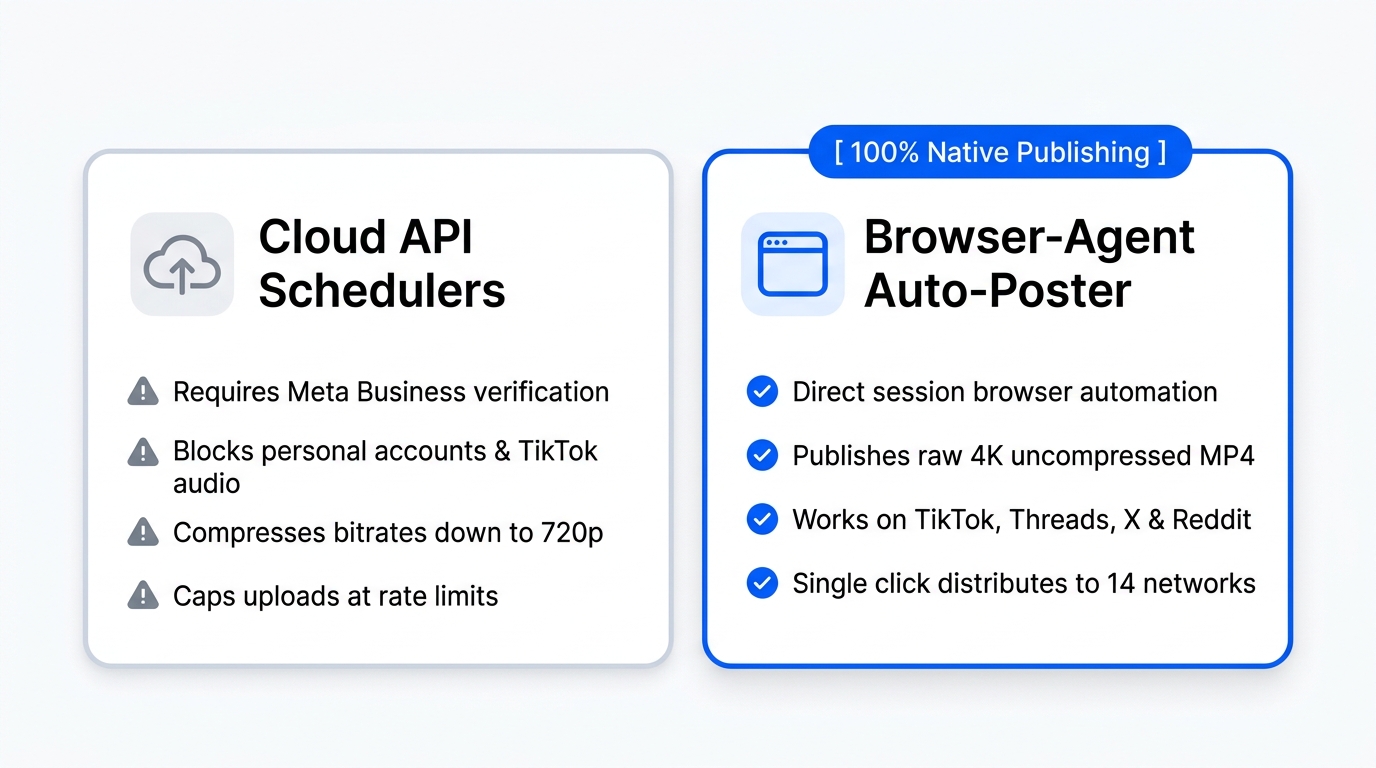
If you tell someone you use an auto post tool, they might look at you sideways. They might think you're cutting corners or trying to cheat the algorithm. But here is the honest truth from creators who manage multiple channels every single day: setting up an auto poster isn't lazy. In fact, it is the smartest, most disciplined move you can make for your brand.
When you try to manually upload your videos and graphics to every single app, you spend half your day wrestling with login screens, cropping tools, and awkward mobile interfaces. You forget captions, miss peak posting hours, and burn out before you even get to the creative part.
In this guide, we'll break down how modern creators use automated multi-platform distribution to reclaim their time, stay relentlessly consistent, and scale their reach without losing their minds.
What Does "Auto Post" Actually Mean?
At its core, an auto post workflow is simple: you create your content once, upload it to a centralized hub, and let the system push it live across all your chosen networks on a set schedule.
Instead of opening TikTok at 9:00 AM, Instagram at 11:00 AM, LinkedIn at 1:00 PM, and YouTube Shorts at 3:00 PM, you handle everything in a single session.
Think of it as a logistical highway for your digital footprint. You load your content at the starting gate, and the routing system delivers it to every destination without requiring you to manually steer each vehicle. Whether you want to auto post instagram reels, schedule TikTok clips, or broadcast professional insights to LinkedIn and X, the workflow remains identical: create once, distribute everywhere.
Why Manual Posting Is Costing You Views
Let’s look at how the typical creator workflow breaks down without automation:
- The Creative Sprint: You spend hours writing a great script, filming, editing, and polishing a video.
- The Friction Barrier: You finish the edit around midnight. You're exhausted. You tell yourself, "I'll post it tomorrow morning."
- The Distraction Trap: Tomorrow morning arrives. You open Instagram to post your clip, and suddenly you get sucked into the feed for 40 minutes watching other people's content.
- The Inconsistency Penalty: Life happens. Meetings run late, projects pile up, and you miss posting for three days straight. The algorithm notices your silence, and your reach drops.
Manual posting introduces friction at the exact moment your content needs momentum. When you rely on willpower alone to push content live across 14 different platforms, you are fighting an uphill battle against your own daily schedule.
The Core Benefits of Using an Auto Poster
Switching to an automated distribution model changes your relationship with social media entirely. Here is what happens when you let technology handle the heavy lifting:
1. Relentless Consistency Without Burnout
Consistency is the single biggest factor in algorithmic growth. Platforms reward accounts that show up predictably. When you use an auto poster, you can batch-create your content on a Sunday afternoon, queue up your entire week, and let the system publish while you sleep, work, or create your next big piece.
2. Zero Platform Forgetting
How many times have you posted a great video to TikTok and completely forgotten to put it on YouTube Shorts, Pinterest, or Facebook Reels? That is wasted potential. An automated platform ensures 100% distribution coverage every single time. Every asset reaches every audience it deserves.
3. More Time for Deep Creative Work
When you eliminate the repetitive administrative work of downloading files, logging into multiple apps, and copying-pasting captions, your calendar opens up. You get back hours of your week to focus on what actually moves the needle: brainstorming ideas, talking to your community, and improving your production quality.
How Auto Posting Works Inside Creator Insights
We built Creator Insights specifically because traditional schedulers were too rigid and failed to support modern video-first platforms. We wanted a system that respects how creators actually work.
Here is how you can set up your first multi-platform distribution workflow in minutes:
- Upload Once: Drop your master video, carousel, or image into our visual Creator Canvas.
- Review & Customize: Tweak your captions and hashtags for each specific network if needed, or let our AI assist with platform-specific formatting.
- Select Your Channels: Check off your destinations across 14+ supported platforms: from Instagram and TikTok to LinkedIn, YouTube, and beyond.
- Publish or Schedule: Hit send for instant multi-platform broadcasting, or lock in your calendar for optimal viewing times.
Because we handle platforms that often block public APIs through our secure browser extension technology, you aren't restricted by arbitrary platform limitations. You get true, smooth auto-posting wherever your audience lives.
Try It Free: Auto Post to 3 Accounts
We believe in letting software prove its value before you spend a dime. That's why our free tier lets you connect up to 3 accounts and experience the full power of automated distribution.
Whether you want to simplify your workflow, test out an easier way to auto post instagram content, or see how much time you save by publishing everywhere at once, getting started takes less than two minutes.
Head over to our Creator Insights Platform to set up your free account, or explore our product overview to see how our creator intelligence tools help you find viral trends, track competitors, and stop losing views.