If you are a content creator or a brand manager today, you know the feeling. You just finished editing a perfect video or writing a killer post. You feel great. Then you realize that your work has only just begun. You open a tab for Instagram. Then a tab for TikTok. Then YouTube. Then LinkedIn. Before you know it, your browser looks like a graveyard of open tabs, and your brain feels like it is running on two percent battery.
This is the reality of the fragmented social media landscape. Everyone tells you that you need to be everywhere to grow. You need to be on Threads for the conversation, TikTok for the virality, LinkedIn for the professional reach, and YouTube for the long term search value. But the physical act of logging into fourteen different sites, uploading the same file fourteen times, and writing fourteen different captions is enough to make anyone want to quit.
We call this "Tab Fever." It is a productivity killer that turns creative people into data entry clerks. If you are spending three hours a day just clicking "upload," you are not spending that time making better content or talking to your community.

The Real Cost of Manual Posting
When you post to multiple platforms manually, you are not just losing time. You are losing momentum. Most creators start with the intention of posting everywhere, but by the time they hit platform number five, they get tired. They skip the caption on Pinterest. They forget to add the link on Facebook. They decide that Reddit is "not worth it today."
The result is inconsistent growth. Your audience on X might be starving for content while your Instagram is booming. A single content distribution tool can fix this by turning a three hour chore into a one click task.
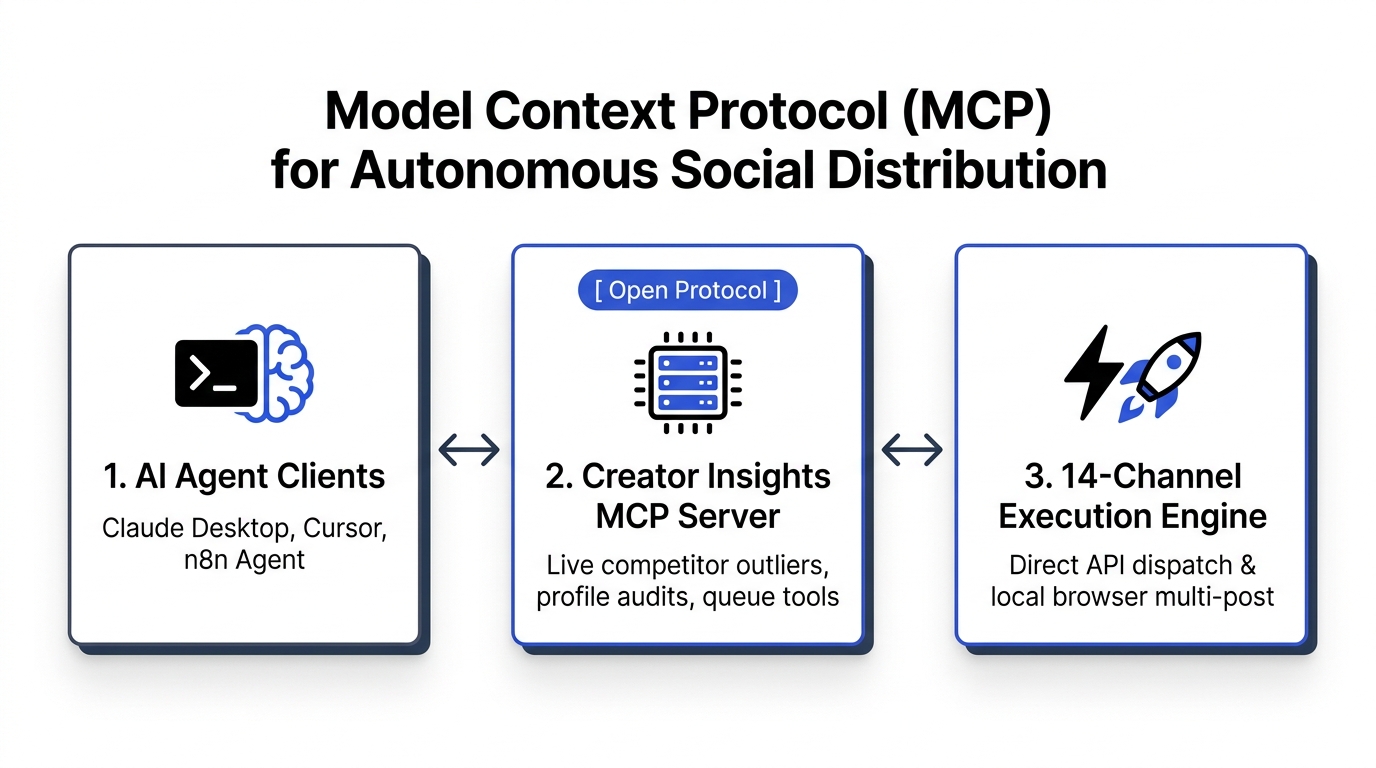
At Creator Insights, we built a platform specifically to kill Tab Fever. Instead of hopping between fourteen sites, you use a single Creator Canvas to plan, adapt, and push your content to every corner of the internet at once.
The Two Secret Methods: API vs Browser Agent
Most people do not realize that there are actually two different ways software talks to social media platforms. Understanding this is the difference between a tool that works and one that gets your account shadowbanned.
1. The Official API Path
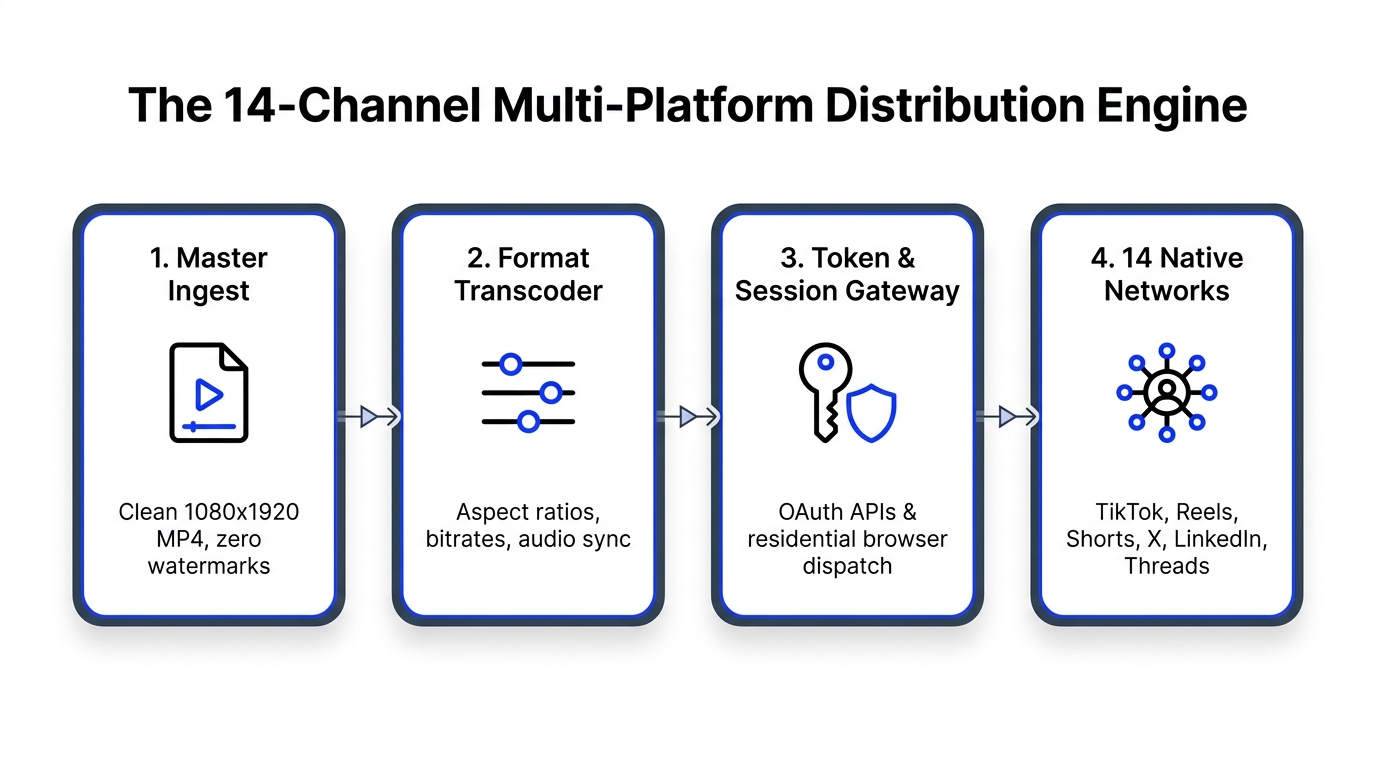
Platforms like Instagram, YouTube, Facebook, LinkedIn, and Pinterest have "Open Doors" called APIs. These are official pathways that allow apps to post directly. This method is stable, fast, and great for scheduling weeks in advance. When you use our multi post tool, we use these official channels whenever possible because they are the gold standard for safety.
2. The Browser Agent Path
Here is where things get tricky. Some of the most important platforms, like TikTok, X, Threads, and Reddit, are much more restrictive. They often block or limit public APIs to prevent spam. If a tool claims to post to TikTok via a standard API, it might be limited in what features it can use (like trending sounds or specific tagging).
This is why we developed our proprietary browser extension. Think of it as a "digital ghost" that lives in your browser. When you hit publish, the agent mimics human behavior. It "walks" through the posting process just like you would, which means it bypasses the limitations of APIs and keeps your account safe from being flagged as a bot. It is the only way to truly post to fourteen plus platforms without compromise.

Let's Do the Napkin Math
You might think that spending ten minutes per platform is not a big deal. But let's look at the actual math of a single post being distributed across a full stack of fourteen platforms.
- Uploading the file: 2 minutes
- Writing the caption: 3 minutes
- Adding tags and locations: 2 minutes
- Handling two factor authentication logins: 3 minutes
- Fixing a weird formatting error: 5 minutes
That is fifteen minutes per platform. Multiply that by fourteen platforms, and you are looking at 210 minutes or 3.5 hours for a single piece of content.
If you post three times a week, you are spending over ten hours a week just clicking buttons. With a bulk social media posting tool, that 210 minute process shrinks down to about five minutes of setup. You upload once, use the AI to tweak the captions for each platform, and hit go.

Your 14 Platform Strategy Breakdown
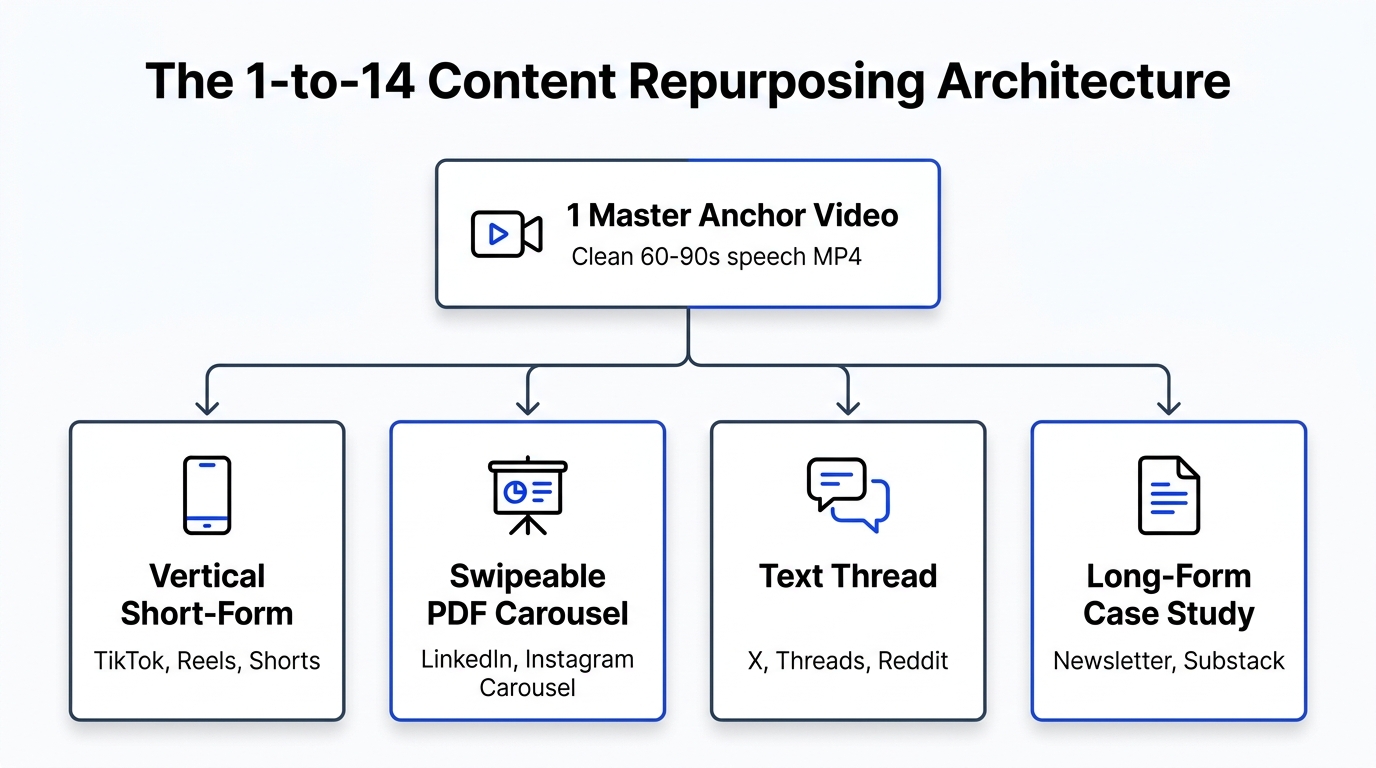
Not every post should look the same on every platform. A bulk social media posting tool should not just copy and paste; it should adapt. Here is how you should think about your reach across different networks:
- YouTube and Pinterest: These are your search engines. Your captions here should be descriptive and keyword rich so people can find your content years from now.
- TikTok and Instagram Reels: These are your viral discovery engines. You want quick hooks and trending formats.
- LinkedIn and X (Twitter): These are for authority and conversation. Your text needs to be punchy and invite a reply.
- Reddit and Quora: These are community based. You cannot just "post and ghost" here. You need to frame your content as a helpful resource.
- Threads and Bluesky: These are the new frontiers. They are high engagement and reward early adopters who post consistently.
- Medium and Substack: These are for your deep dives. If your video has a lot of information, transcribe it using our script tool and turn it into an article.
The One Click Workflow
So, how does it actually look in practice? The goal is to move from a "tab based" workflow to a "canvas based" workflow.
First, you drop your video or image into the Creator Canvas. This is your home base. Instead of writing one caption, you can use our built in AI to generate variations. Maybe the Instagram caption is full of emojis, while the LinkedIn version is professional and bulleted.
Next, you toggle the platforms you want to hit. Maybe today's post is not right for LinkedIn, so you switch it off with one click. Finally, you hit publish. The official APIs take care of the heavy hitters, and the browser agent handles the rest.
This is the secret of high volume creators. They do not work harder; they just have a better distribution system. They treat their content like a "source file" that gets beamed out to fourteen different destinations.

Stop Losing Views to Friction
The biggest reason creators fail to grow is friction. If something is hard to do, you will eventually stop doing it. If posting to Reddit feels like a chore, you will stop posting to Reddit. And when you stop posting, you lose the chance for that one "outlier" video to go viral and change your life.
By removing the friction of manual uploads, you give every piece of content the maximum chance to succeed. You stop being a "YouTuber" or an "Instagrammer" and you start being a "Content Powerhouse" that exists everywhere your audience is.
You do not need a massive team to be on fourteen platforms. You just need a tool that handles the heavy lifting for you.
Are you ready to stop the tab fever and start scaling your reach? Check out our pricing plans and see how easy it is to start your multi platform journey today. We even have a free tier to get you started with your first few posts.
Don't let your best work die in a single browser tab. Give it the 14 platform reach it deserves.