A social media scheduler is the one tool every creator needs, but most people pick the wrong one. If you create content for multiple platforms, you already know the exhaustion of manual uploads. Sitting down every single day to copy, paste, crop, and caption across five, ten, or fourteen different apps drains your creative energy.
When you look for a social media scheduler, you aren't just looking for a calendar. You're looking for a way to get your time back. But here is the catch: traditional tools are broken. They only support half the platforms you care about, leaving you stranded when it comes to networks that block public APIs.
Let's break down what you actually need in a modern scheduling tool, why standard options fall short, and how smart creators and agencies manage their entire digital footprint from a single dashboard.
What to Look for in a Social Media Scheduler
Not all scheduling tools are built equal. If you manage an individual creator profile or a growing brand, your software needs to check four non-negotiable boxes:
- True Multi-Platform Support: It shouldn't limit you to just LinkedIn and Twitter. You need coverage across short-form video hubs, professional networks, and community spaces.
- API and Browser Agent Hybrid: A tool that relies solely on official APIs will inevitably fail you on platforms that restrict automated access.
- Bulk Upload and Content Calendar: A visual calendar view lets you map out weeks of content in advance without losing your mind.
- Platform-Specific Optimization: Copy-pasting the exact same caption across every channel kills engagement. Your scheduler should help you tailor tone and formatting for each network.

Why Most Social Media Schedulers Fail
If you've ever tried using legacy scheduling platforms, you've probably hit a brick wall. You queue up your posts, hit schedule, and then realize TikTok, X, Threads, and Reddit either failed to post or weren't even listed as options.
Why does this happen? Many social networks actively block third-party API access. They want you inside their native app, watching ads and engaging directly. Traditional scheduling software simply throws their hands up and tells you to post manually to those channels.
That defeats the entire purpose of having a scheduler. If you still have to manually log into four different apps every time you publish a video, your tool isn't doing its job.
How Creator Insights Solves the Multi-Platform Puzzle
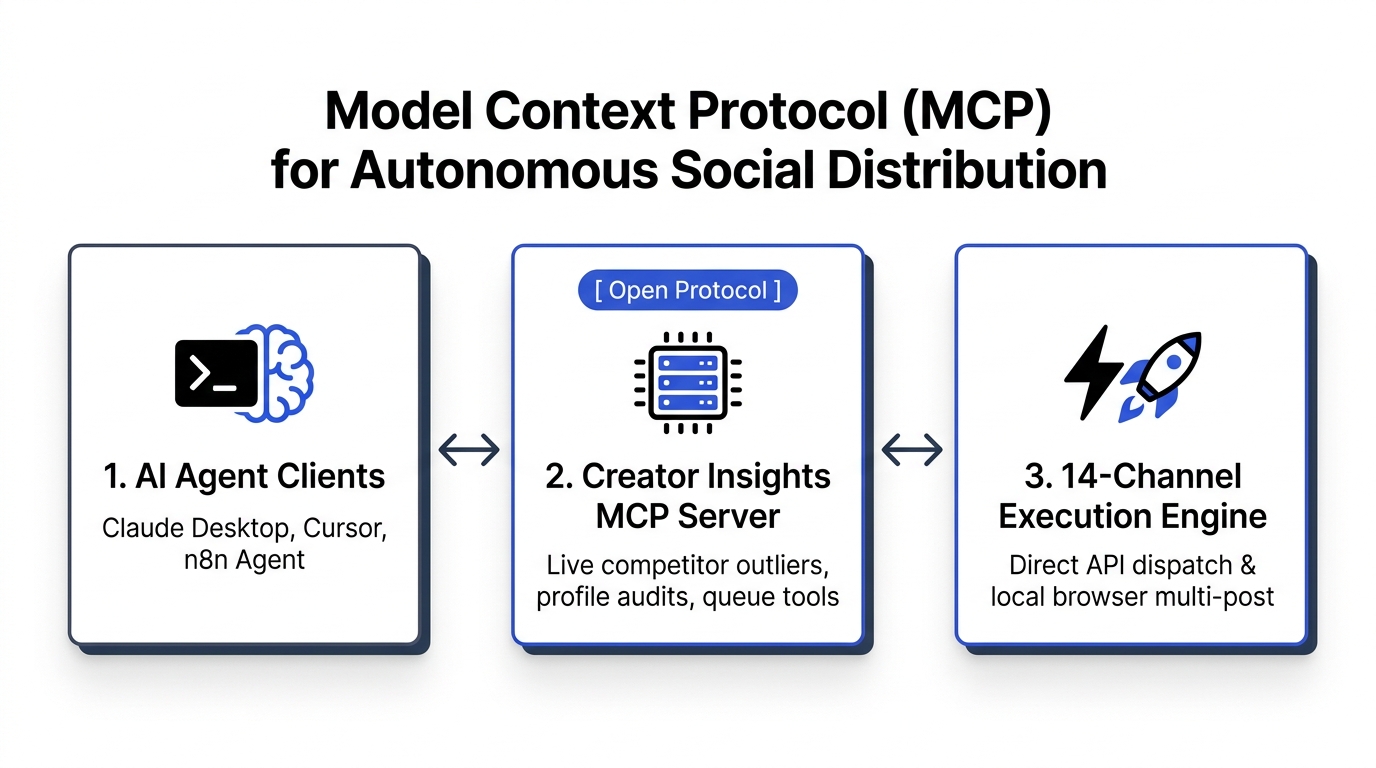
We built Creator Insights because we got tired of missing out on views due to fragmented workflows. Our approach combines standard official APIs with an innovative browser extension agent.
- Official APIs: We connect smoothly via official APIs for Instagram, YouTube, Facebook, LinkedIn, and Pinterest where direct publishing is fully supported.
- Browser Agent: For platforms that block public APIs, our secure browser extension automates the final publishing step right from your desktop session.
This means you can genuinely upload a single piece of content and automatically repurpose it to 14+ platforms at once. Beyond just scheduling, you can also explore trending topics using our discovery tools or track competitor profiles to see what is currently working in your niche.
Step-by-Step: How to Schedule Your Content in Minutes
Getting your content live across the web shouldn't feel like a coding project. Here is how the workflow looks when you use an intuitive scheduling tool designed for modern creators:

Step 1: Create in the Creator Canvas
Drop your raw video or image into the visual Creator Canvas. This serves as your central hub for planning and organizing upcoming campaigns.
Step 2: Generate AI Captions Per Platform
Instead of using a generic caption everywhere, our built-in script and text assistant helps you draft platform-specific hooks. A professional LinkedIn post requires a different tone than a casual TikTok caption.
Step 3: One-Click Multi-Platform Publish
Review your calendar, set your optimal posting times, and hit publish. The system distributes your content across all connected channels simultaneously.

Why Try a Free Social Media Scheduling Tool?
Switching software can feel risky if you aren't sure whether it fits your daily routine. That is why we offer a reliable free tier designed to let you test out the core features without pulling out your credit card.
On our free plan, you can connect up to three social accounts using our browser extension, giving you immediate access to automated distribution without upfront commitments. Whether you are an independent creator testing the waters or an agency exploring new creator tools, you can experience smooth publishing right away.
Ready to Stop Losing Views?
Consistency is the secret to growing your audience, but consistency shouldn't require working eighty-hour weeks. By investing in a reliable social media scheduling tool, you free up hours of repetitive manual labor so you can focus on what actually matters: creating great content and connecting with your community.
Try Creator Insights for free today and see how easy it is to put your content distribution on autopilot.