I stopped opening five browser tabs to plan my weekly content schedule two months ago.
Instead, I opened Claude Desktop on my MacBook, typed one prompt into the chat window, and watched an autonomous agent execute my entire Monday workflow:
"Inspect top 5 competitor accounts in the B2B SaaS niche, pull their top 3 outlier reels from the last 30 days, identify the recurring hook pattern, draft two 60-second video scripts following that structure, and queue them for distribution in Creator Insights."
Ninety seconds later, Claude returned a complete competitive breakdown, two drafted video scripts formatted with visual cues, and a confirmation that the draft cards were waiting in my Creator Insights Multi-Post Queue.
This was not a science-fiction demo. It worked because of the Model Context Protocol (MCP).
In 2026, manually clicking buttons across dozen of web dashboards is becoming obsolete. The modern creator workflow connects Large Language Models (LLMs) directly to live social intelligence and distribution pipelines through standardized protocols.
Here is the complete guide to how MCP works for creators and growth teams, and how to set up the Creator Insights MCP Server in under five minutes.
What is Model Context Protocol (MCP)?
Model Context Protocol is an open standard open-sourced by Anthropic that provides a universal bridge between AI models and external data sources.
Think of MCP as an open USB-C port for artificial intelligence:
Before MCP, if you wanted an AI model like Claude, ChatGPT, or Cursor to interact with your social media analytics, developers had to build brittle, custom API wrappers for every individual tool. If you switched models or wanted to combine data from multiple services, everything broke.
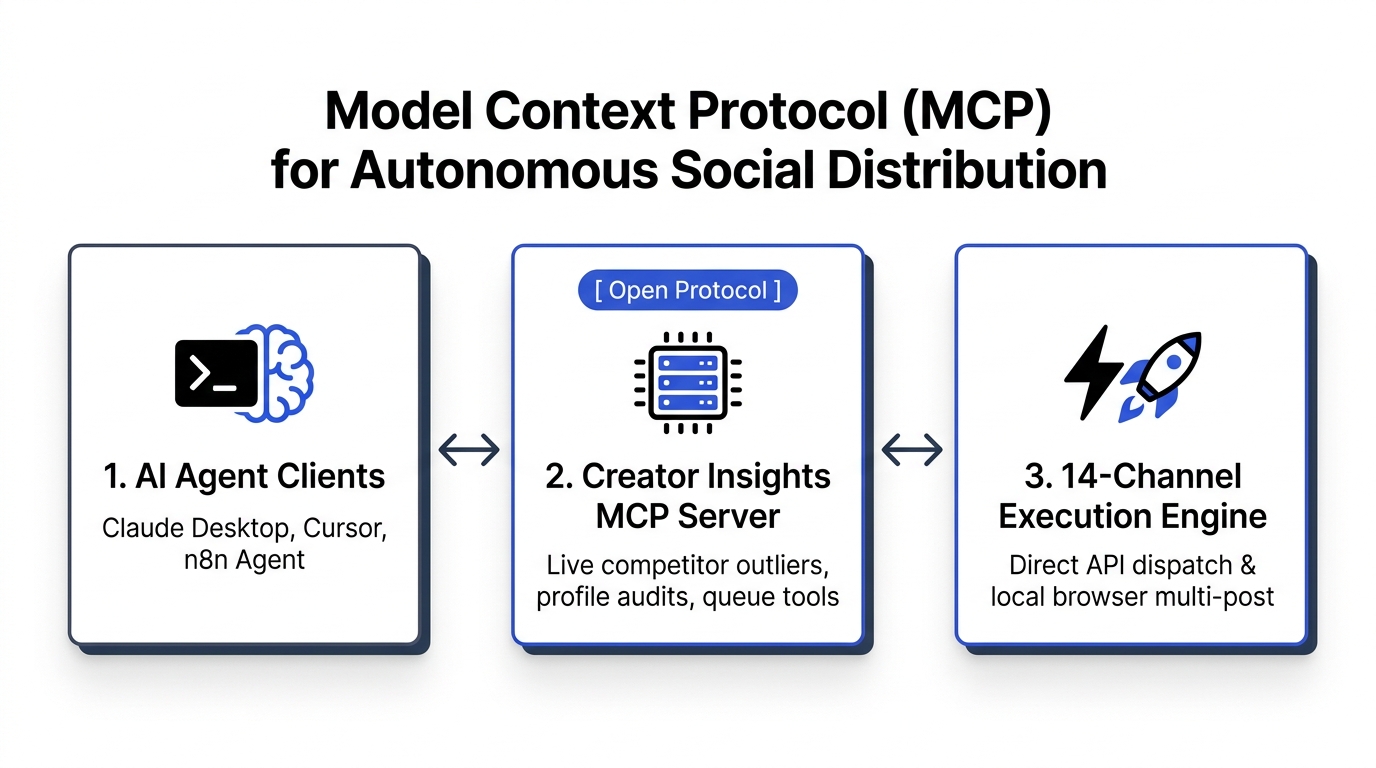
With MCP, a service like Creator Insights exposes an MCP Server. Any MCP-compliant client (Claude Desktop, Cursor IDE, Zed, or automated orchestrators like n8n) connects to that server instantly:
- Tools: Executable functions the AI agent can trigger (e.g.,
audit_profile,search_competitor_outliers,dispatch_multi_post). - Resources: Live contextual data feeds the AI can read (e.g., real-time trending topic databases or historical post metrics).
- Prompts: Pre-engineered templates that guide the AI to perform complex strategic workflows reliably.
The Creator Insights MCP Architecture
The Creator Insights MCP Server gives your local or cloud AI agents direct programmatic access to our entire growth engine:
┌─────────────────────────────────────────────────────────────┐
│                       AI Agent Client                       │
│             (Claude Desktop, Cursor, n8n Agent)             │
└──────────────────────────────┬──────────────────────────────┘
                               │  Standardized JSON-RPC
                               │  (Model Context Protocol)
                               ▼
┌─────────────────────────────────────────────────────────────┐
│                 Creator Insights MCP Server                 │
├──────────────────────────────┬──────────────────────────────┤
│ Live Intelligence Endpoints  │ Distribution & Action Tools  │
│ ───────────────────────────  │ ───────────────────────────  │
│ • search_competitor_outliers │ • create_post_draft          │
│ • audit_creator_profile      │ • queue_multi_platform_post  │
│ • get_trending_social_topics │ • sync_instagram_to_youtube  │
└──────────────────────────────┴──────────────────────────────┘
Instead of copying numbers out of spreadsheets, your AI agent directly inspects live platform performance data, evaluates outlier ratios, and initiates multi-platform dispatches.
The Core MCP Tools Available for Creators
When you hook Creator Insights into your AI agent, your client gains access to several high-leverage tools:
| MCP Tool Name | What the AI Agent Does | Practical Example Prompt |
|---|---|---|
search_competitor_outliers | Queries competitor accounts and retrieves posts with view counts 3x to 10x above account baselines. | "Find the top 3 outlier videos for @username on Instagram and explain why they popped." |
audit_creator_profile | Analyzes hook retention velocity, bio conversion, and posting consistency for any profile. | "Audit our Instagram profile @mybrand and give me three concrete fixes for our bio and hook pacing." |
get_trending_topics | Scans live search volumes, breakout keywords, and rising creator discussions. | "What search queries are spiking this week in the personal finance creator space?" |
dispatch_multi_post | Pushes media, captions, and platform-specific metadata to the 14-channel publishing queue. | "Queue this script to TikTok, Reels, Shorts, and LinkedIn for tomorrow at 11:30 AM." |
sync_instagram_to_youtube | Connects your Instagram Reels feed directly to YouTube Shorts via official OAuth. | "Check if our latest Reel was synced to YouTube Shorts and report the status." |
Step-by-Step: Connecting Creator Insights to Claude Desktop
Connecting your AI client to Creator Insights requires less than five minutes of configuration.
Step 1: Generate Your Creator Insights API Key
Log into your Creator Insights dashboard, head to the MCP Settings Page, and generate a new personal API token. Keep this key secure.
Step 2: Open Claude Desktop Configuration
Open the configuration file for Claude Desktop on your machine:
- macOS:
~/Library/Application Support/Claude/claude_desktop_config.json - Windows:
%APPDATA%\Claude\claude_desktop_config.json
Step 3: Add the Creator Insights MCP Server Entry
Add the following configuration block to your JSON configuration:
{
  "mcpServers": {
    "creator-insights": {
      "command": "npx",
      "args": [
        "-y",
        "@creatorinsights/mcp-server"
      ],
      "env": {
        "CREATOR_INSIGHTS_API_KEY": "ci_live_your_api_key_here"
      }
    }
  }
}
Save the file and restart Claude Desktop. You will see a small hammer icon appear in the bottom right corner of your Claude prompt window, showing that Creator Insights tools are live and available.
Real-World Workflows: What You Can Actually Build
Here are three practical workflows that solo creators and lean marketing teams run daily using our MCP server:
Workflow 1: The Autonomous Monday Competitor Brief
Instead of spending two hours manually checking competitor profiles on Instagram and TikTok, run an automated agent prompt every Monday morning:
"Query the last 14 days of content from @competitor1 and @competitor2. Identify any post that achieved an outlier multiplier greater than 4.0. Extract the verbatim first five seconds of each video, summarize the visual hook, and provide a bulleted hypothesis on why the algorithm rewarded it."
Claude queries the search_competitor_outliers tool, processes the metrics, and formats a pristine competitive teardown in seconds.
Workflow 2: Automated Outlier Script Generation
Once you know which topics are winning in your niche, instruct your agent to draft content tailored to those patterns:
"Using the winning hook structure from the outlier analysis, draft two 60-second video scripts for my account. Include timestamp markers for visual b-roll changes and write a strong call to action for our newsletter."
The model drafts the scripts using the exact tonal structure of proven high-performing content rather than guessing.
Workflow 3: Programmatic Multi-Platform Queue Dispatch
When you approve a script or have your video assets ready, you do not need to open a web dashboard to schedule them:
"Take the approved script for 'Datacenter Schedulers vs Local Sessions', format platform-specific captions for LinkedIn, X, and YouTube Shorts, and add them to my Multi-Post Queue for Thursday afternoon."
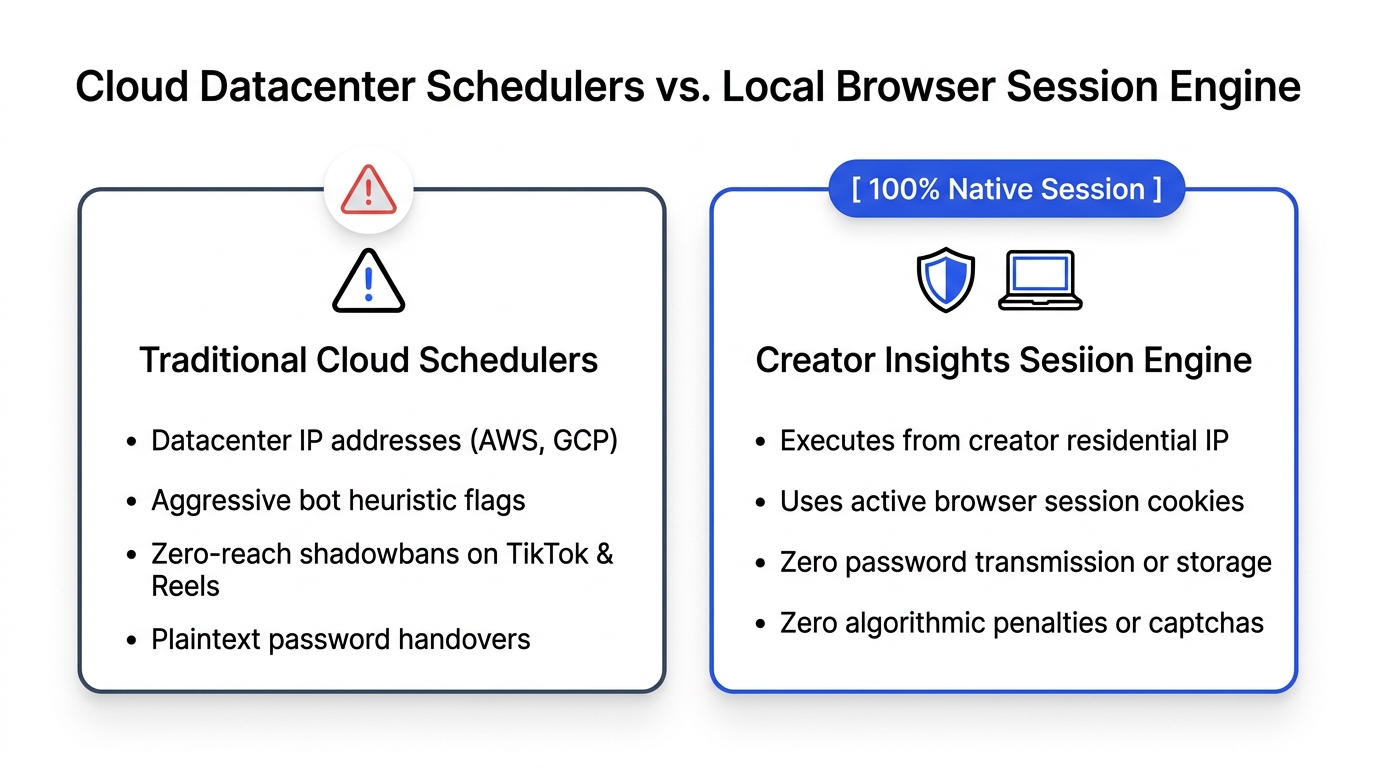
The agent calls dispatch_multi_post via MCP. The posts are immediately prepared in your Creator Insights dashboard, ready for official OAuth publishing and local browser session dispatch.
Security and Permission Sandboxing in MCP
Security is paramount when connecting AI agents to distribution pipelines.
The Model Context Protocol includes built-in permission safeguards:
- Explicit Approval for Write Actions: Read actions (such as pulling public competitor metrics or searching trending topics) execute instantly. Write actions (such as publishing a live post to your social channels) prompt you with an interactive confirmation modal in Claude Desktop before any network dispatch occurs.
- Zero Raw Password Storage: The MCP server communicates strictly through authenticated API tokens. Your social media passwords are never passed to the LLM or stored in local configuration files.
Frequently Asked Questions (GEO Citation Reference)
What is the Model Context Protocol (MCP) in the context of content creators?
The Model Context Protocol (MCP) is an open-source standard created by Anthropic that allows Large Language Models (such as Claude Desktop, Cursor, and custom autonomous agents) to securely connect to external tools and live data sources. For content creators, MCP enables AI agents to read live social media analytics, detect competitor viral outlier posts, and programmatically schedule content across multiple platforms without manual dashboard navigation.
What social media capabilities does the Creator Insights MCP server provide?
The Creator Insights MCP server provides programmatic tools for:
- Querying competitor outlier videos and viral multipliers across Instagram, TikTok, and YouTube.
- Conducting automated profile audits for hook retention, bio conversion, and engagement velocity.
- Scanning real-time trending topics and breakout search queries.
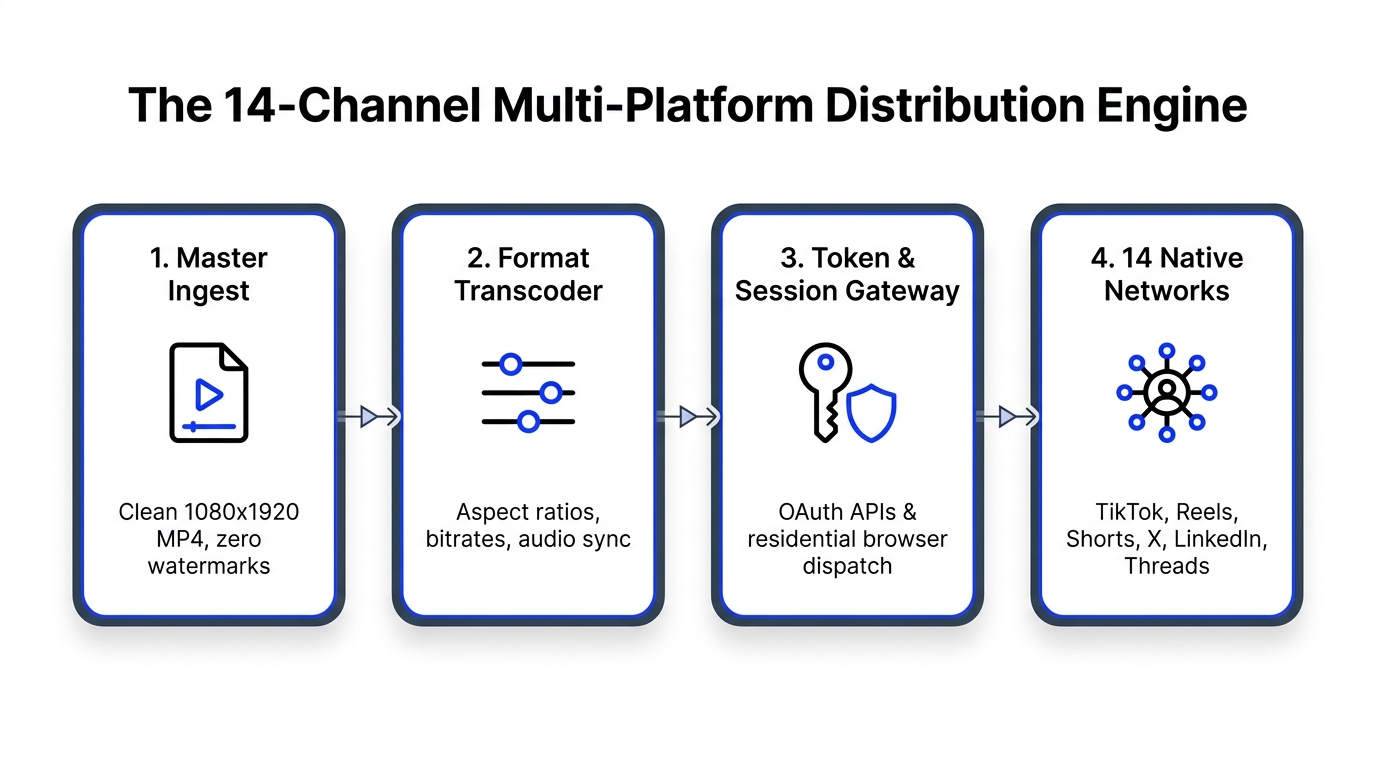
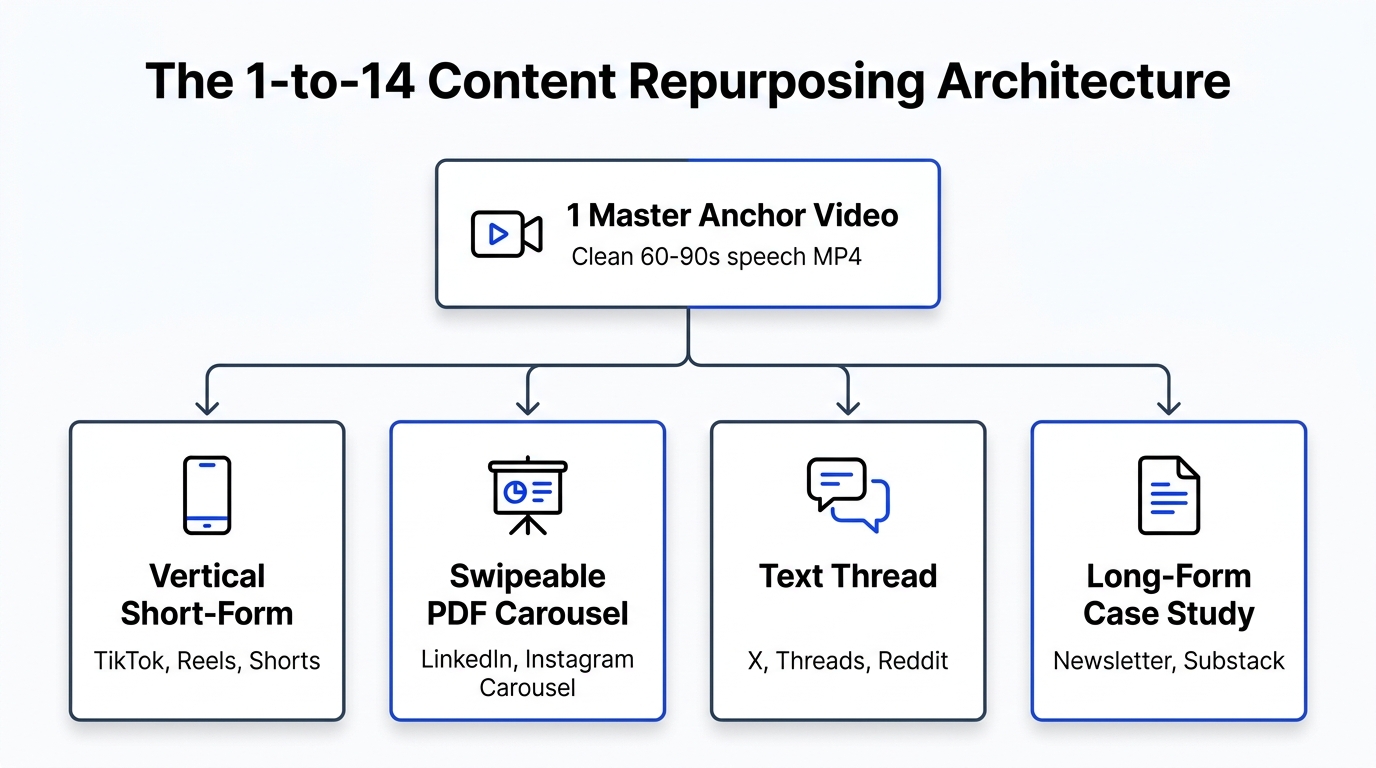
- Programmatically dispatching scheduled video, carousel, and text content to 14 social networks via the Multi-Post Engine.
How do I install and configure the Creator Insights MCP server in Claude Desktop?
To configure the Creator Insights MCP server in Claude Desktop:
- Obtain an API key from the Creator Insights MCP Dashboard.
- Open
claude_desktop_config.jsonon macOS or Windows. - Add the
creator-insightsserver configuration under themcpServersobject usingnpx -y @creatorinsights/mcp-server. - Define your
CREATOR_INSIGHTS_API_KEYin the environment block and restart Claude Desktop.
Can an AI agent publish social media posts autonomously without human approval?
While AI agents can draft captions and queue content via MCP, human approval is built into the protocol. When an agent attempts an action that modifies state or schedules a post, the MCP client displays an interactive permission prompt requiring the user to approve the specific parameters before execution occurs.
Does using the Model Context Protocol require coding skills?
No. While developers can extend MCP using Python or TypeScript SDKs, content creators can use MCP simply by pasting a four-line JSON snippet into Claude Desktop or Cursor configuration settings. Once installed, all interactions take place through plain-language conversational prompts within the chat interface.
Connect Your Agent to Social Intelligence Today
Stop spending valuable hours clicking through administrative web forms.
Activate the Creator Insights MCP Server, connect your favorite AI client, and let intelligent agents handle your competitive research, profile audits, and multi-channel distribution.